class Person {
		String name;
		int age;
		String address;
}
객체 생성과 속성 접근
public class Main {

		public static void main(String[] args) {

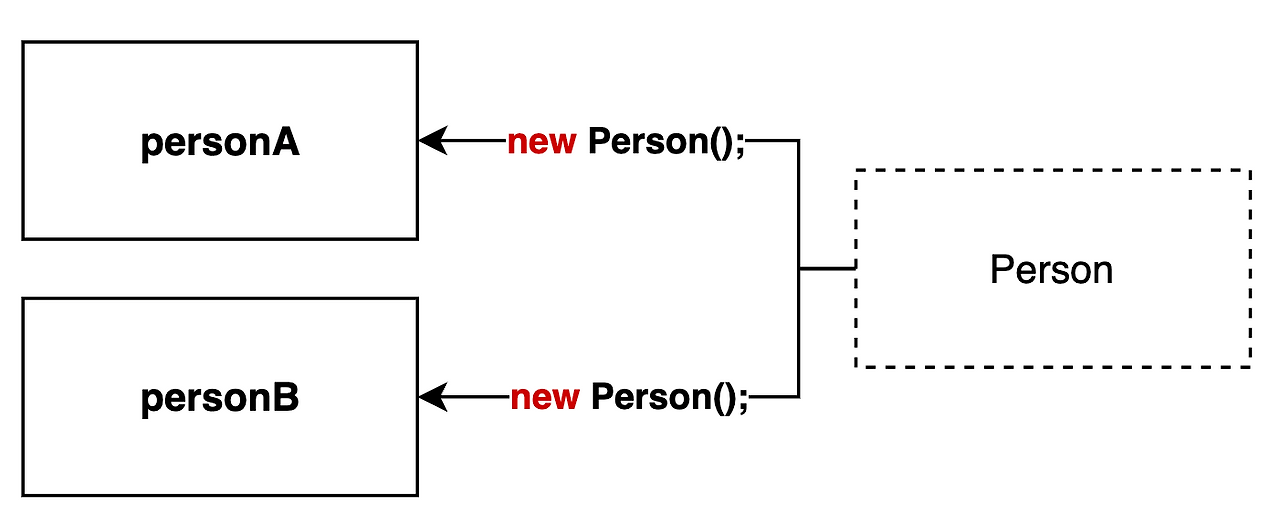
        Person personA = new Person("eunji",27);
        Person personB = new Person("yutae",32);

        System.out.println("설정전 personA 이름:"+personA.name);
        System.out.println("설정전 personB 이름:"+personB.name);
        personA.name = "eunji";
        personB.name ="yutae";
        System.out.println("설정후 personA 이름:"+personA.name);
        System.out.println("설정후 personB 이름:"+personB.name);
		}
}
	class person
    Person(String name, int age){
        this.name = name;
        this.age = age;

   	class main
	Person personA = new Person("eunji",27);
	Person personB = new Person("yutae",32);
	calss person
	int plus(int value1, int value2){
	int result = value1 + value2;
	return result;

	calss main
	int result1 = personA.plus(2,7);
	int result2 = personB.plus(3,2);
	System.out.println("result1 ="+result1);
	System.out.println("result2 ="+result2);
class person
    void setAddress(String address){
        this.address = address;

class main
        personA.setAddress("서울");
        System.out.println("personA의 주소: "+personA.address);
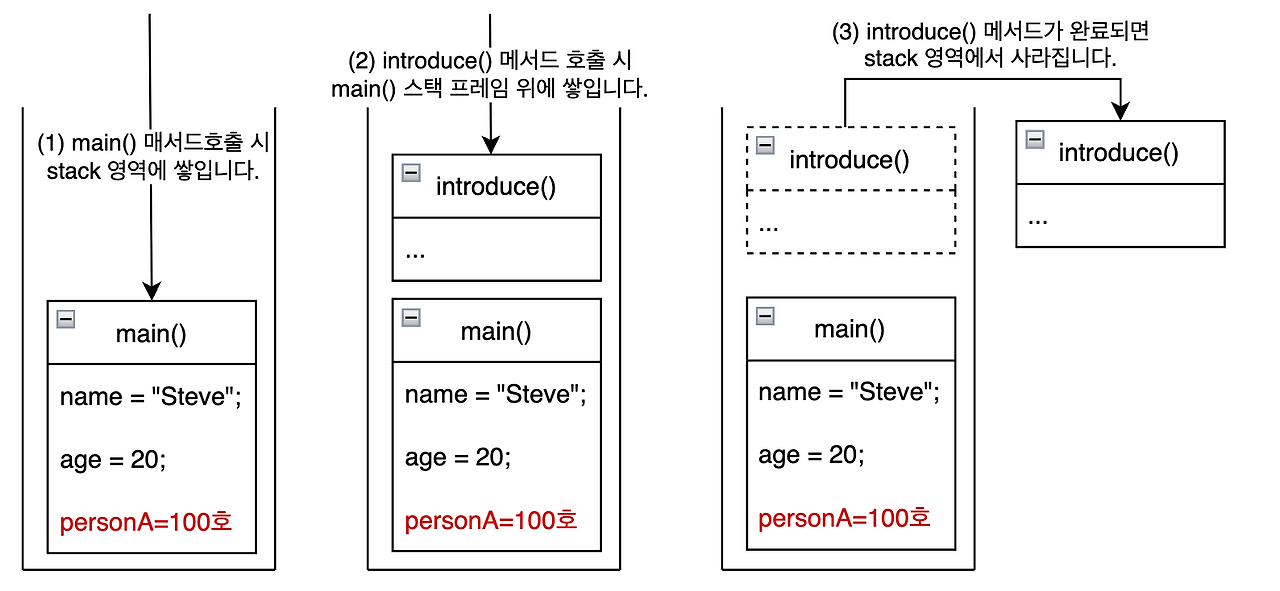
특정 메서드 실행 > 해당 메서드의 정보와 변수가 Stack 에 저장 > 메서드 실행이 끝나면 그 메모리는 자동으로 제거
지역변수들이 저장되는 공간
public class Main {

    public static void main(String[] args) {
        String name = "Steve"; // 1
        int age = 20;
        Person personA = new Person(name, age); // personA = @100호
        personA.introduce(); // 2
    }
}
Person personA = new Person("Steve"); // ✅ 객체가  담긴 personA 는 참조형 변수입니다.
Syetem.out.println(personA.name);
System.out.println(personA); // ✅ 출력하면 @123 메모리의 주소값이 출력됩니다.
class Person {
		// ✅ static 변수
		static int population = 0;

		// ✅ static 메서드
		static void printPopulation() {
				System.out.println("현재 인구 수: " + population);
		}
}
public class Main {
    public static void main(String[] args) {

        Person p1 = new Person(); // p1 객체 생성
        p1.name = "gygim"; // ✅ p1 객체의 데이터에 접근

        Person p2 = new Person(); // p2 객체 생성
        p2.name = "Steve"; // ✅ p2 객체의 데이터에 접근
    }
}
class Person {
		String name;

		void printName() { // ✅ 인스턴스 메서드
				System.out.println("나의 이름은 " + this.name + "입니다.");
		}
}
public class Main {
    public static void main(String[] args) {

        Person p1 = new Person();
        p1.name = "gygim";
        p1.printName(); // ✅ p1 객체의 메서드 실행

        Person p2 = new Person();
        p2.name = "Steve";
        p2.printName(); // ✅ p2 객체의 메서드 실행
    }
}
class Person {
		static int population = 0; // ✅ 클래스 변수
}
public class Main {
    public static void main(String[] args) {

        // ✅ 객체 생성 전에도 클래스 레벨에서 직접 접근가능
        System.out.println("현재 인구 수: " + Person.population);

        Person p1 = new Person();
        Person p2 = new Person();

        // ✅ 모든 객체가 하나의 값을 공유
        System.out.println("현재 인구 수: " + Person.population);
    }
}
class Person {
		static int population = 0;

		public Person(String name) {
				this.name = name;
				population++; // 생성자 호출시 populataion 1 증가
		}

		static void printPopulation() {
				System.out.println("현재 인구 수: " + population); // ✅ 클래스 메서드
		}
}
public class Main {
    public static void main(String[] args) {

		    // ✅ 객체생성 여부에 상관없이 사용 가능
        Person.printPopulation(); // 현재 인구 수: 0

        Person p1 = new Person("gygim"); // 생성시마다 population 1 증가
        Person p2 = new Person("Steve"); // 생성시마다 population 1 증가

        Person.printPopulation(); // 현재 인구 수: 2
    }
}
public class Person {
    String name;

    public static void staticMethod() {
        System.out.println(this.name);  // ⚠️ 오류 발생
    }
}
public class Example {
    int instanceVar = 10;

    public static void main(String[] args) {
        Example ex = new Example();
        System.out.println(ex.instanceVar);  // ✅ 정상 출력
    }
}
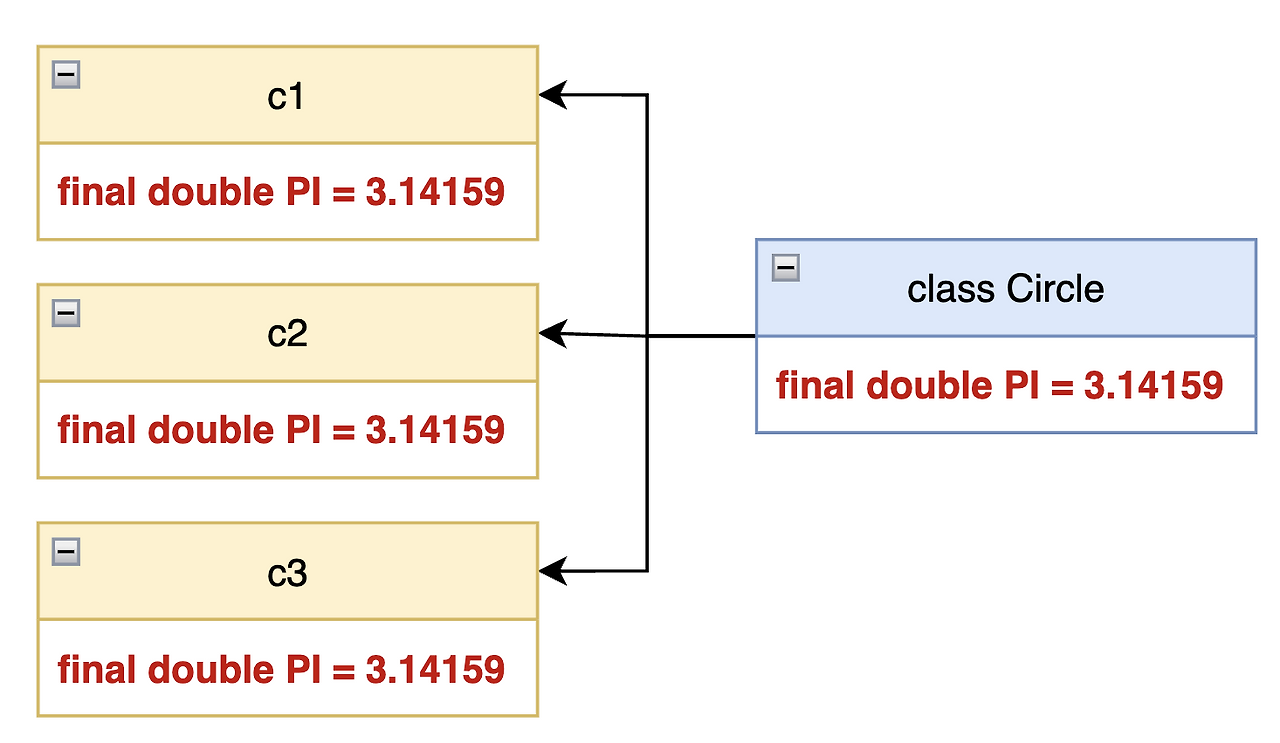
public class Circle {

    final static double PI = 3.14159; // ✅ 직접 만든 원주율 상수
    double radius; // ⚠️ final 로 선언되어 있지 않기 때문에 외부에서 변경 가능

    Circle(double radius)  {
        this.radius = radius;
    }
}
final Circle c1 = new Circle(2);
c1 = new Circle(3); // ❌ final은 변수 c1이 한 번 참조한 객체는 다른 객체로 변경될 수 없음을 의미함 (참조 불변)

// 하지만 객체 내부의 속성 값은 변경 가능 (불변 객체가 아님)
c1.radius = 3; // ⚠️ 내부 상태 변경 가능 (객체 자체가 불변이 아님)
올바른 사용: 속성에 final 명령어 사용
public final class Circle {

    final static double PI = 3.14159;
    final double radius; // ✅ final 로 선언해서 값이 변경되지 않도록 합니다.

    Circle(double radius)  {
        this.radius = radius;
    }
}
3) 불변객체 값 변경 필요한 경우
새로운 객체 생성
public final class Circle {
    public static final double PI = 3.14159;
    private final double radius;

    public Circle(double radius) {
        this.radius = radius;
    }

    // ✅ 반지름이 다른 새로운 Circle 생성 (불변 객체 유지)
    public Circle changeRadius(double newRadius) {
        return new Circle(newRadius); // 생성자 호출: 기존 객체 변경 X, 새 객체 생성
    }
}
public class Main {
    public static void main(String[] args) {
        ACar car1 = new LuxuryCar();
        BCar car2 = new SpeedCar();

				// ❌ 일관되지 않은 주행 명령어
        car1.move();
        car1.stop();
        // ❌ 일관되지 않은 주행 명령어 + 멈출수 없음
        car2.drive();
    }
}
class ACar implements Car {

		@Override
    void drive() { // ✅ 인터페이스 규칙 준수
        System.out.println("멋지게 이동합니다."); // 구현 내용은 자유롭습니다.
    }

    @Override
    void stop() { // ✅ 인터페이스 규칙 준수
		    System.out.println("멋지게 정지합니다."); // 구현 내용은 자유롭습니다.
	  }

	  void charge() { // 🎉 CarA 만의 기능을 확장 가능합니다.
			  System.out.println("차량을 충전합니다");
	  }
}
class BCar implements Car {

		@Override
    void drive() { // ✅ 인터페이스 규칙 준수
        System.out.println("빠르게 이동합니다."); // 구현 내용은 자유롭습니다.
    }

    @Override
    void stop() { // ✅ 인터페이스 규칙 준수
		    System.out.println("빠르게 정지합니다."); // 구현 내용은 자유롭습니다.
    }

    void autoParking() { // 🎉 CarB 만의 기능을 확장 가능합니다.
		    System.out.println("자동 주차 기능을 실행합니다.");
    }
}
public class Main {
    public static void main(String[] args) {
        ACar car1 = new LuxuryCar();
        BCar car2 = new SpeedCar();

				// ✅ 각 차량의 공통 기능
        car1.drive();
        car1.stop();
        car2.drive();
        car2.stop();

        // ✅각 차량의 고유 기능(추가기능-인터페이스 확장)
        car1.charge();
        car2.autoParking();
    }
}
// 🚀 "동물의 기본 기능" 인터페이스
interface Animal {
    void eat();
}

// ✈ "나는 기능" 인터페이스
interface Flyable {
    void fly();
}

// ✅ 다중 구현
class Bird implements Animal, Flyable {
    public void eat() {
        System.out.println("새가 먹이를 먹습니다.");
    }

    public void fly() {
        System.out.println("새가 하늘을 납니다.");
    }

    // 추가적으로 land() 메서드도 가능하지만 필수는 아님
    public void land() {
        System.out.println("새가 착륙합니다.");
    }
}
// 실행 코드
public class Main {
    public static void main(String[] args) {
        Bird bird = new Bird();
        bird.eat();  // "새가 먹이를 먹습니다."
        bird.fly();  // "새가 하늘을 납니다."
        bird.land(); // "새가 착륙합니다."
    }
}
// 1. 기본 인터페이스: 동물의 기본 기능
interface Animal {
    void eat();
}

// 2. 추가 인터페이스: 나는 기능
interface Flyable {
    void fly();
}

// 3. ✅ 다중 상속새로운 인터페이스: 동물 + 나는 기능
interface FlyableAnimal extends Animal, Flyable {
    void land();  // 추가 기능
}

// 4. 새 클래스 (FlyableAnimal을 구현)
class Bird implements FlyableAnimal {

    public void eat() {
        System.out.println("새가 먹이를 먹습니다.");
    }

    public void fly() {
        System.out.println("새가 하늘을 납니다.");
    }

    public void land() {
        System.out.println("새가 착륙합니다.");
    }
}
// 5. 실행 코드
public class Main {
    public static void main(String[] args) {
        Bird bird = new Bird();
        bird.eat();  // "새가 먹이를 먹습니다."
        bird.fly();  // "새가 하늘을 납니다."
        bird.land(); // "새가 착륙합니다."
    }
}