➕ 예외와 예외처리
1. 예외
- 프로그램 실행 중 예상하지 못한 상황 발생
- 의도적으로 예외 발생: throw 키워드
- 예외를 처리하지 않으면 비정상적 프로그램 종료 > 예외처리(try-catch)를 통해 프로그램이 안정적으로 실행
2. 예외 발생
1) 의도하지 않은 예외
- 10 / 0 연산을 수행하면서 ArithmeticException (산술예외)가 발생
public class Main {
    public static void main(String[] args) {
        System.out.println("프로그램 시작");
        int result = 10 / 0; // ❌ 예외 발생 (ArithmeticException)
        System.out.println("이 문장은 실행되지 않음");
    }
}
Exception in thread "main" java.lang.ArithmeticException: / by zero
at chapter3.exception.Main.main(Main.java:8)
Process finished with exit code 12) 의도적인 예외 (throw)
- 특정 조건에서 의도적으로 예외를 발생
- 미성년자 접근금지
- age < 18 조건을 만족 > IllegalArgumentException 을 발생
public class Main {
    public static void main(String[] args) {
        int age = 10;
        if (age < 18) {
		        // ✅ 의도적으로 예외를 발생시키는 부분
            throw new IllegalArgumentException("미성년자는 접근할 수 없습니다!");
        }
        System.out.println("....");
    }
}
3. 예외 구조와 종류
1) 구조와 종류
- RuntimeException - UncheckedException : 예외처리를 컴파일러가 확인x
- Exception - CheckedException: 예외처리를 컴파일러가 확인
2) 예외 전파
- 메서드에서 발생한 예외가 해당 메서드 내에서 처리되지 않았을 때 메서드를 호출한 상위 메서드로 전달되는 과정
- 프로그램 시작 지점(main()) 까지 전파되고 끝내 처리되지 않으면 프로그램이 비정상 종료
3) RuntimeException - 언체크 예외 전파
- 컴파일러가 예외 처리를 강제하지 않는 예외(빨간줄x)
- 처리되지 않은 예외는 계속 프로그램 시작 지점까지 전파
- 끝내 예외가 처리되지 않으면 프로그램이 비정상적으로 종료
- try-catch 활용
public class ExceptionPractice {
    public void callUncheckedException() {
        if (true) {
            System.out.println("언체크 예외 발생");
            throw new RuntimeException(); // ✅ 예외발생
        }
    }
}
public class Main {
public static void main(String[] args) {
// 예외 실습 객체 인스턴스화
ExceptionPractice exceptionPractice = new ExceptionPractice();
// ✅ 언체크 예외 호출
exceptionPractice.callUncheckedException();
// ❌ 예외처리를 해주지 않았기 때문에 프로그램이 종료됩니다.
System.out.println("이 줄은 실행되지 않습니다.");
}
}public class Main {
public static void main(String[] args) {
ExceptionPractice exceptionPractice = new ExceptionPractice();
// ✅ 상위로 전파된 예외처리
try {
exceptionPractice.callUncheckedException();
} catch (RuntimeException e) { // ✅ 예외처리
System.out.println("언체크 예외 처리");
} catch (Exception e) {
System.out.println("체크 예외 처리");
}
System.out.println("프로그램 종료");
}
}4) Exception - 체크 예외 전파
- 컴파일러가 예외 처리를 강제하는 예외
- try-catch 활용
public class ExceptionPractice {

    public void callCheckedException() {
		    // ✅ try-catch 로 예외 처리
        try {
            if (true) {
                System.out.println("체크예외 발생");
                throw new Exception();
            }
        } catch (Exception e) {
            System.out.println("예외 처리");
        }
    }
}
public class Main {
public static void main(String[] args) {
// 예외 실습 객체 인스턴스화
ExceptionPractice exceptionPractice = new ExceptionPractice();
// ✅ 체크예외 호출
exceptionPractice.callCheckedException();
}
}- throws 활용: 예외를 호출한 곳에서 처리
public class ExceptionPractice {

    public void callCheckedException() throws Exception { // ✅ throws 예외를 상위로 전파
        if (true) {
            System.out.println("체크예외 발생");
            throw new Exception();
        }
    }
}
package chapter3.exception;
public class Main {
public static void main(String[] args) {
// 예외 실습 객체 인스턴스화
ExceptionPractice exceptionPractice = new ExceptionPractice();
// 체크 예외 사용
// ✅ 반드시 상위 메서드에서 try-catch 를 활용해 주어야합니다.
try {
exceptionPractice.callCheckedException();
} catch (Exception e) {
System.out.println("예외처리");
}
}
}➕ Optinal
1. 개념
- null 을 안전하게 다루게 해주는 객체
- null : 값이 없음 또는 참조하지 않음
- NullPointerException(NPE)을 방지 > 런타임 예외 : 처리해 주지 않으면 프로그램이 종료
2. 필요한 이유 (npe 발생)
- Student 먼저 생성: 없는 경우 camp.getStudent()(null 반환메서드) 반환 시 npe 발생
public class Student {

    // 속성
    private String name;

    // 생성자

    // 기능
    public String getName() {
        return this.name;
    }
}
public class Camp {
// 속성
private Student student;
// 생성자
// 기능: ⚠️ null 을 반환할 수 있는 메서드
public Student getStudent() {
return student;
}
public void setStudent(Student student) {
this.student = student;
}
}public class Main {
public static void main(String[] args) {
Camp camp = new Camp();
Student student = camp.getStudent(); // ⚠️ student 에는 null 이 담김
// ⚠️ 아래 코드에서 NPE 발생! 컴파일러가 잡아주지 않음
String studentName = student.getName(); // 🔥 NPE 발생 -> 프로그램 종료
System.out.println("studentName = " + studentName);
}
}3. null 직접 처리 한계
- if문을 활용해서 null 처리가능하나 null이 발생할 가능성을 미리 예측하고 처리하는 것이 어려움
public class Main {
    public static void main(String[] args) {
        Camp camp = new Camp();
        Student student = camp.getStudent();

        String studentName;
        if (student != null) { // ⚠️ 가능은하지만 현실적으로 어려움
            studentName = student.getName();
        } else {
            studentName = "등록된 학생 없음"; // 기본값 제공
        }

        System.out.println("studentName = " + studentName);
    }
}
4. Optional 활용
1) 개념
- Optional 객체는 값이 있을 수도 있고 없을 수도 있음
- Optional 객체를 메서드 반환 자료형에 선언해서 해당 메서드가 null 이 반환될 가능성을 명확하게 전달
- Optional.ofNullable() 을 사용하여 null이 반환될 수 있는 객체를 감쌈
- isPresent() 와 같은 Optional API 를 통해 안전하게 null 처리
2) isPresent() 활용 방법
- Optional 내부의 값이 존재할 경우에 true 반환
- 내부 값이 null 일 경우 false 를 반환
import java.util.Optional;

public class Camp {

    // 속성
    private Student student;

    // 생성자

    // 기능
    // ✅ null 이 반환될 수 있음을 명확하게 표시
    public Optional<Student> getStudent() {
        return Optional.ofNullable(student);
    }

    public void setStudent(Student student) {
		    this.student = student;
    }
}
public class Main {
public static void main(String[] args) {
Camp camp = new Camp();
// isPresent() 활용시 true 를 반환하고 싶을때 활용
// Student newStudent = new Student();
// camp.setStudent(newStudent);
// Optional 객체 반환받음
Optional<Student> studentOptional = camp.getStudent();
// Optional 객체의 기능 활용
boolean flag = studentOptional.isPresent(); // false 반환
if (flag) {
// 존재할 경우
Student student = studentOptional.get(); // ✅ 안전하게 Student 객체 가져오기
String studentName = student.getName();
System.out.println("studentName = " + studentName);
} else {
// null 일 경우
System.out.println("학생이 없습니다.");
}
}
}3) orElseGet() 활용 방법
- 값이 없을 때만 기본값을 제공하는 로직을 실행하는 메서드
- 메서드를 매개변수로 전달
import java.util.Optional;

public class Camp {

    // 속성
    private Student student;

    // 생성자

    // 기능
    // ✅ null 이 반환될 수 있음을 명확하게 표시
    public Optional<Student> getStudent() {
        return Optional.ofNullable(student);
    }
}
import java.util.Optional;
public class Main {
public static void main(String[] args) {
Camp camp = new Camp();
// ✅ Optional 객체의 기능 활용 (orElseGet 사용)
Student student = camp.getStudent()
.orElseGet(() -> new Student("미등록 학생"));
System.out.println("studentName = " + student.getName());
}
}➕ 컬렉션
1. 컬렉션
- 자바 컬렉션 프레임워크 : 인터페이스와 구현체(ArrayList, HashSet, HashMap 등)를 제공하는 집합
- 데이터 저장, 조회, 삭제, 정렬 등 다양한 기능 구현
- 길이를 동적으로 변경
2. 배열의 한계
- 배열 = 크기 고정 / 길이 변경x > 길이 초과시 에러
// 배열은 길이가 고정됨
int[] numbers = new int[3];
numbers[0] = 10;
numbers[1] = 20;
numbers[2] = 30;
numbers[3] = 40; // ❌ 요소 추가시 에러발생- 컬렉션 클래스: ArrayList, HashSet, HashMap 등 (데이터 저장, 관리 가능) / 길이 동적 변경o
컬렉션객체<자료형> 변수이름 = new 컬렉션객체<자료형>();

// 객체<다룰 데이터: 정수> 변수이름 = new 컬렉션객체생성자<정수>();
ArrayList<Integer> arrayList = new ArrayList<Integer>();
ArrayList<Integer> arrayList = new ArrayList<>();
arrayList.add(10);
arrayList.add(20);
arrayList.add(30);
arrayList.add(40); // ✅ 정상 동작 (길이 제한 없음)
3. 컬렉션 종류와 특징

1) Arraylist
- 순서를 유지하고 중복된 값을 저장
// List 를 구현한 ArrayList
ArrayList<String> names = new ArrayList<>();
names.add("Spartan");      // 1 번째 요소 추가
names.add("Steve");        // 2 번째 요소 추가
names.add("Isac");         // 3 번째 요소 추가
names.add("1");
names.add("2");

 // ✅ 순서 보장
System.out.println("names = " + names);

// ✅ 중복 데이터 허용
names.add("Spartan");
System.out.println("names = " + names);

// ✅ 단건 조회
System.out.println("1 번째 요소 조회: " + names.get(0)); // 조회 Spartan

// ✅ 데이터 삭제
names.remove("Steve");
System.out.println("names = " + names);
2) HashSet
- Set 인터페이스 구현: 순서를 유지하지 않고 중복을 허용 x > get 지원x
// Set 을 구현한 HashSet
HashSet<String> uniqueNames = new HashSet<>();

// ✅ 추가
uniqueNames.add("Spartan");
uniqueNames.add("Steve");
uniqueNames.add("Isac");
uniqueNames.add("1");
uniqueNames.add("2");

// ⚠️ 순서를 보장 안함
System.out.println("uniqueNames = " + uniqueNames);
uniqueNames.get(0); // ❌ get 사용 불가

// ⚠️ 중복 불가
uniqueNames.add("Spartan");
System.out.println("uniqueNames = " + uniqueNames);

// ✅ 제거
uniqueNames.remove("Spartan");
System.out.println("uniqueNames = " + uniqueNames);- Map 인터페이스 구현: 키(Key) - 값(Value) 구조로 데이터를 저장 / 키 중복x / 순서보장 x
// Map 을 구현한 HashMap
HashMap<String, Integer> memberMap = new HashMap<>();

// ✅ 추가
memberMap.put("Spartan", 15);
memberMap.put("Steve", 15); // ✅ 값은 중복 가능
memberMap.put("Isac", 1);
memberMap.put("John", 2);
memberMap.put("Alice", 3);

// ⚠️ 순서 보장 안함
System.out.println("memberMap = " + memberMap);

// ⚠️ 키 중복 불가: 값 덮어쓰기 발생
memberMap.put("Alice", 5);
System.out.println("memberMap = " + memberMap);

// ✅ 조회: 15
System.out.println(memberMap.get("Steve"));

// ✅ 삭제 가능
memberMap.remove("Spartan");
System.out.println("memberMap = " + memberMap);

// ✅ 키 확인
Set<String> keys = memberMap.keySet();
System.out.println("keys = " + keys);

// ✅ 값 확인
Collection<Integer> values = memberMap.values();
System.out.println("values = " + values);
➕ 제네릭
1. 제네릭
- 클래스, 메서드 등에 사용되는 <T>타입 매개변수
- 타입을 미리 지정x > 유연하게 결정
- 코드 재사용성과 타입 안정성(잘못된 타입 사용 방지)을 보장
2. 제네릭이 없는 경우
1) 재사용 불가
public class Box {
    private Integer item; // ⚠️ Integer 타입으로 고정

    public Box(Integer item) { // ⚠️ Integer 타입으로 고정
        this.item = item;
    }

    public Integer getItem() {
        return this.item;
    }
}
public class Main {
public static void main(String[] args) {
// ✅ Integer 타입 박스
Box box1 = new Box(100);
// ❌ String 타입을 저장하려면 새로운 클래스를 만들어야 함
Box box2 = new Box("ABC");
}
}
2) 낮은 타입 안정성
- 실행 중 오류가 발생할 가능성 / 런타임 오류 발생
public class ObjectBox {
    private Object item; // ⚠️ 다형성: 모든 타입 저장 가능 (하지만 안전하지 않음)

    public ObjectBox(Object item) {
        this.item = item;
    }

    public Object getItem() {
        return this.item;
    }
}
public class Main {
public static void main(String[] args) {
// ✅ ObjectBox 사용
ObjectBox objBox = new ObjectBox("Hello");
String str = (String) objBox.getItem(); // 형변환 필요
System.out.println("objBox 내용: " + str); // Hello
// ⚠️ 실행 중 오류 발생 (잘못된 다운 캐스팅: ClassCastException)
objBox = new ObjectBox(100); // 정수 저장
String error = (String) objBox.getItem(); // ❌ 오류: Integer -> String
System.out.println("잘못된 변환: " + error);
}
}
→ 잘못된 다운캐스팅 활용 시: ClassCastException
3. 제네릭 활용
- <T>(타입매개변수): 타입을 의미하는 자리 / 데이터 타입으로 대체되어 활용
public class GenericBox<T> { // ✅ 제네릭 클래스
    private T item;

    public GenericBox(T item) { // 다양한 타입 저장 가능
        this.item = item;
    }

    public T getItem() {
        return this.item;
    }
}- 타입소거(Erasure) : 컴파일 시점에 제네릭 타입 정보를 제거하는 과정
<T> 타입 매개변수 부분은 Object 로 대체
자동으로 강제 다운 캐스팅(cast) 코드를 삽입하여 타입 안전성을 보장
public class Main {
    public static void main(String[] args) {

        // 1. ✅ 재사용 가능(컴파일시 타입소거: T -> Object)
        GenericBox<String> strGBox = new GenericBox<>("ABC");
        GenericBox<Integer> intGBox = new GenericBox<>(100);
        GenericBox<Double> doubleGBox = new GenericBox<>(0.1);

        // 2. ✅ 타입 안정성 보장(컴파일시 타입소거: 자동으로 다운캐스팅)
        String strGBoxItem = strGBox.getItem();
        Integer intGBoxItem = intGBox.getItem();
        Double doubleGBoxItem = doubleGBox.getItem();
        System.out.println("strGBoxItem = " + strGBoxItem);
        System.out.println("intGBoxItem = " + intGBoxItem);
        System.out.println("doubleGBoxItem = " + doubleGBoxItem);
    }
}
4. 제네릭 메서드
- 메서드 선언부에 <T> 가 선언된 메서드
- 클래스 제네릭 타입과 별개로 독립적인 타입 매개변수를 가짐
public class GenericBox<T> {

    // 속성
    private T item;

    // 생성자
    public GenericBox(T item) {
        this.item = item;
    }

    // 기능
    public T getItem() {
        return this.item;
    }

		// ⚠️ 일반 메서드 T item 는 클래스의 <T> 를 따라갑니다.
    public void printItem(T item) {
        System.out.println(item);
    }

    // ✅ 제네릭 메서드 <S> 는 <T> 와 별개로 독립적이다.
    public <S> void printBoxItem(S item) {
        System.out.println(item);
    }
}
public class Main {
public static void main(String[] args) {
GenericBox<String> strGBox = new GenericBox<>("ABC");
GenericBox<Integer> intGBox = new GenericBox<>(100);
// ⚠️ 일반메서드: 클래스 타입 매개변수를 따라갑니다.
// String 데이터 타입 기반으로 타입소거가 발생.
// String 타입의 다운캐스팅 코드 삽입!
strGBox.printItem("ABC"); // ✅ String 만 사용가능
strGBox.printItem(100); // ❌ 에러 발생
// ✅ 제네릭 메서드: 독립적인 타입 매개변수를 가집니다.
// String 타입 정보가 제네릭 메서드에 아무런 영향을 주지 못함.
// 다운캐스팅 코드 삽입되지 않음.
strGBox.printBoxItem("ABC"); //✅ 모든 데이터 타입 활용 가능
strGBox.printBoxItem(100); //✅ 모든 데이터 타입 활용 가능
strGBox.printBoxItem(0.1); //✅ 모든 데이터 타입 활용 가능
}
}➕ 람다
1. 익명클래스
- 별도의 클래스 파일을 만들지 않고 코드 내에서 일회성으로 정의해 사용하기 때문에 이름x
- 인터페이스, 클래스(일반, 추상)의 구현과 상속을 활용해 익명 클래스를 구현
- 인터페이스를 활용한 익명 클래스
public interface Calculator {

    int sum(int a, int b);
}
public class Main {
public static void main(String[] args) {
// ✅ 익명 클래스 활용
Calculator calculator1 = new Calculator() {
@Override
public int sum(int a, int b) {
return a + b;
}
};
int ret1 = calculator1.sum(1, 1);
System.out.println("ret1 = " + ret1);
}
}2. 람다
- 함수형 인터페이스를 통해서 구현 권장: 하나의 추상 메서드만 가져야 하기 때문
하나의 추상 메서드를 가진 일반 인터페이스 통해서도 사용o - 람다식을 활용한 익명 클래스 변환
// 람다 표현식
Calculator calculator1 = (a, b) -> a + b;

// 익명클래스
Calculator calculator1 = new Calculator() {
		@Override
		public int sum(int a, int b) {
				return a + b;
		}
};
@FunctionalInterface // ✅ 함수형 인터페이스 선언
public interface Calculator {
int sum(int a, int b); // ✅ 오직 하나의 추상 메서드만 선언해야합니다.
}public class Main {
public static void main(String[] args) {
...
// ✅ 람다식 활용
Calculator calculator2 = (a, b) -> a + b;
int ret2 = calculator2.sum(2, 2);
System.out.println("ret2 = " + ret2);
}
}3. 주의사항
- 함수형 인터페이스를 활용
- 두 개 이상의 추상 메서드가 존재 > 어떤 메서드를 구현하는지 모호
- ex: 오버로딩 기능
> 같은 이름의 sum() 메서드를 여러 형태로 정의
> 람다 표현식이 어떤 메서드를 구현하는 것인지 명확하지 않아 모호성이 발생
public interface Calculator {
    int sum(int a, int b);        // ✅ 선언 가능
    int sum(int a, int b, int c); // ⚠️ 오버로딩으로 선언 가능 모호성 발생!
}
@FunctionalInterface // ✅ 함수형 인터페이스 선언
public interface Calculator {
int sum(int a, int b); // ✅ 오직 하나의 추상 메서드만 선언해야합니다.
int sum(int a, int b, int c); // ❌ 선언 불가 에러발생!
}4. 람다식을 매개변수로 전달
- 익명 클래스를 변수에 담아 전달(직접 객체를 생성)
public class Main {
    public static int calculate(int a, int b, Calculator calculator) {
        return calculator.sum(a, b);
    }

    public static void main(String[] args) {

        Calculator cal1 = new Calculator() {
            @Override
            public int sum(int a, int b) {
                return a + b;
            }
        };

        // ✅ 익명 클래스를 변수에 담아 전달
        int ret3 = calculate(3, 3, cal1);
        System.out.println("ret3 = " + ret3); // 출력: ret3 = 6
    }
}- 람다식을 변수에 담아 전달
public class Main {

    public static int calculate(int a, int b, Calculator calculator) {
        return calculator.sum(a, b);
    }

    public static void main(String[] args) {
        Calculator cal2 = (a, b) -> a + b;

        // ✅ 람다식을 변수에 담아 전달
        int ret4 = calculate(4, 4, cal2);
        System.out.println("ret4 = " + ret4); // 출력: ret4 = 8
    }
}- 람다식을 직접 전달
public class Main {

    public static int calculate(int a, int b, Calculator calculator) {
        return calculator.sum(a, b);
    }

    public static void main(String[] args) {
        // ✅ 람다식을 직접 매개변수로 전달
        int ret5 = calculate(5, 5, (a, b) -> a + b);
        System.out.println("ret5 = " + ret5); // 출력: ret5 = 10
    }
}
➕ 스트림
1. 스트림
- 데이터를 효율적으로 처리할 수 있는 흐름
- 특징: 선언형 스타일로 가독성이 굉장히 뛰어남
- 데이터 준비 → 중간 연산 → 최종 연산 순으로 처리
- 컬렉션과 자주 함께 활용
2. for 과 스트림 비교
- arrayList 의 각 요소를 10배로 변환
List<Integer> arrayList = new ArrayList<>(List.of(1, 2, 3, 4, 5));public class Main {
public static void main(String[] args) {
// ArrayList 선언
List<Integer> arrayList = new ArrayList<>(List.of(1, 2, 3, 4, 5));
// ✅ for 명령형 스타일: 각 요소 * 10 처리
List<Integer> ret1 = new ArrayList<>();
for (Integer num : arrayList) {
int multipliedNum = num * 10; // 각 요소 * 10
ret1.add(multipliedNum);
}
System.out.println("ret1 = " + ret1);
}
}public class Main {
public static void main(String[] args) {
// ArrayList 선언
List<Integer> arrayList = new ArrayList<>(List.of(1, 2, 3, 4, 5));
// ✅ 스트림 선언적 스타일: 각 요소 * 10 처리
List<Integer> ret2 = arrayList.stream().map(num -> num * 10).collect(Collectors.toList());
System.out.println("ret2 = " + ret2);
}
}3. 스트림 (선언형 스타일)
1) 스트림 처리단계
- 여러 API 제공
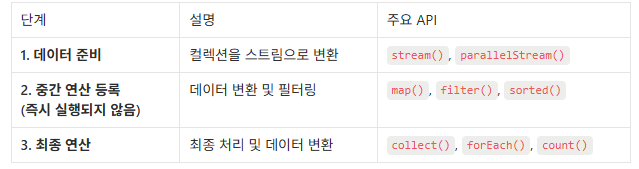
2) 스트림을 사용 > 각 요소를 10배로 변환 후 리스트로 변환
- stream() → map() → collect() 순으로 데이터 흐름을 처리
stream(): 데이터 준비 - 데이터를 스트림으로 변환하여 연산 흐름을 만들 준비
map(): 중간 연산 등록 - 각 요소를 주어진 함수에 적용해서 변환
collect(): 최종 연산 - 결과를 원하는 형태(List, Set)로 수집
arrayList
	.stream()  // 1. 데이터 준비
	.map()     // 2. 중간 연산 등록
	.collect() // 3. 최종 연산
// 1. 데이터 준비: 스트림 생성
Stream<Integer> stream = arrayList.stream();
// 2. 중간 연산 등록: 각 요소를 10배로 변환 로직 등록
Stream<Integer> mappedStream = stream.map(num -> num * 10);
// 3. 최종 연산: 최종 결과 리스트로 변환
List<Integer> ret2 = mappedStream.collect(Collectors.toList());// ✅ 한 줄로 표현 가능
List<Integer> ret2 = arrayList.stream() // 1. 데이터 준비
.map(num -> num * 10) // 2. 중간 연산 등록
.collect(Collectors.toList()); // 3. 최종 연산4. 스트림과 람다식 활용
- 각 요소 * 10 예시
- 매개변수 = 함수형 인터페이스
// map() 메서드를 살펴봅시다.
<R> Stream<R> map(Function<? super T, ? extends R> mapper);- 익명클래스를 변수에 담아 활용
Function<T, R> T 는 매개변수, R 은 반환 타입을 의미
public class Main {

    public static void main(String[] args) {

        // ArrayList 선언
        List<Integer> arrayList = new ArrayList<>(List.of(1, 2, 3, 4, 5));

        // ✅ 1. 익명클래스를 변수에 담아 활용
        Function<Integer, Integer> function = new Function<>() {

            @Override
            public Integer apply(Integer integer) {
                return integer * 10;
            }
        };

        List<Integer> ret3 = arrayList.stream()
                .map(function)
                .collect(Collectors.toList());
        System.out.println("ret3 = " + ret3);
    }
}- 람다식을 변수로 활용
public class Main {

    public static void main(String[] args) {

        // ArrayList 선언
        List<Integer> arrayList = new ArrayList<>(List.of(1, 2, 3, 4, 5));

        // ✅ 2. 람다식을 변수에 담아 활용
        Function<Integer, Integer> functionLambda = (num -> num * 10);
        List<Integer> ret4 = arrayList.stream()
                .map(functionLambda)
                .collect(Collectors.toList());
        System.out.println("ret4 = " + ret4);
    }
}- 람다식을 매개변수에 직접 활용
public class Main {

    public static void main(String[] args) {

        // ArrayList 선언
        List<Integer> arrayList = new ArrayList<>(List.of(1, 2, 3, 4, 5));

        // ✅ 3. 람다식을 직접 활용
        List<Integer> ret5 = arrayList.stream()
                .map(num -> num * 10)
                .collect(Collectors.toList());
        System.out.println("ret5 = " + ret5);
    }
}- 전체코드
public class Main {

    public static void main(String[] args) {

        // ArrayList 선언
        List<Integer> arrayList = new ArrayList<>(List.of(1, 2, 3, 4, 5));

        // 스트림 없이: 각 요소 * 10 처리
        ArrayList<Integer> ret1 = new ArrayList<>();
        for (Integer num : arrayList) {
            int multipliedNum = num * 10;
            ret1.add(multipliedNum);
        }
        System.out.println("ret1 = " + ret1);

        // 스트림 활용: 각 요소 * 10 처리
        List<Integer> ret2 = arrayList.stream().map(num -> num * 10).collect(Collectors.toList());
        System.out.println("ret2 = " + ret2);

        // 직접 map() 활용해보기
        // 1. 익명클래스를 변수에 담아 전달
        Function<Integer, Integer> function = new Function<>() {

            @Override
            public Integer apply(Integer integer) {
                return integer * 10;
            }
        };
        List<Integer> ret3 = arrayList.stream()
                .map(function)
                .collect(Collectors.toList());
        System.out.println("ret3 = " + ret3);

        // 2. 람다식을 변수에 담아 전달
        Function<Integer, Integer> functionLambda = (num -> num * 10);
        List<Integer> ret4 = arrayList.stream()
                .map(functionLambda)
                .collect(Collectors.toList());
        System.out.println("ret4 = " + ret4);

				// 람다식 직접 활용
        List<Integer> ret5 = arrayList.stream()
                .map(num -> num * 10)
                .collect(Collectors.toList());
        System.out.println("ret5 = " + ret5);
    }
}
5. 스트림 중간연산 함께 사용하기
- 리스트에서 짝수만 10배로 변환시키는 예시(filter + map)
List<Integer> arrayList = new ArrayList<>(List.of(1, 2, 3, 4, 5));

// ✅ filter() + map() 사용 예제
List<Integer> ret6 = arrayList.stream() // 1. 데이터 준비: 스트림 생성
        .filter(num -> num % 2 == 0)    // 2. 중간 연산: 짝수만 필터링
        .map(num -> num * 10)           // 3. 중간 연산: 10배로 변환
        .collect(Collectors.toList()); // 4. 최종 연산: 리스트로 변환

System.out.println(ret6); // 출력: [20, 40]
// For 문 예시 / for 문과 비교
List<Integer> arrayList = new ArrayList<>(List.of(1, 2, 3, 4, 5));
List<Integer> ret6 = new ArrayList<>();
for (int num : arrayList) {
int remain = num % 2;
if (remain == 0) {
int data = num * 10;
ret6.add(data);
}
}
// 5. 결과 출력
System.out.println(ret6); // 출력: [20, 40]➕ 쓰레드
1. 쓰레드
- 프로그램 내에서 독립적으로 실행되는 하나의 작업 단위(한 명의 일꾼)
- 싱글 쓰레드: 한 번에 하나의 작업만 처리
멀티 쓰레드: 여러 작업을 동시에 처리 / 여러 작업을 병렬로 수행 > 처리 성능을 향상
2. 싱글 쓰레드
- 순차적으로 처리
- main() 메서드: 프로그램 시작과 동시에 생성되는 하나의 쓰레드
public class Main {

    public static void main(String[] args) {
        System.out.println("::: main 쓰레드 시작 :::");
        String threadName = Thread.currentThread().getName();

        // ✅ 하나의 작업 단위: 숫자를 0 부터 9 까지 출력
        for (int i = 0; i < 10; i++) {
            System.out.println("현재 쓰레드: " + threadName + " - " + i);
            try {
                Thread.sleep(500); // 0.5 초 대기
            } catch (InterruptedException e) {
                e.printStackTrace();
            }
        }
        // ✅ 추가작업
        for (int i = 0; i < 10; i++) {
            System.out.println("현재 쓰레드: " + threadName + " - " + i);
            try {
                Thread.sleep(500); // 0.5 초 대기
            } catch (InterruptedException e) {
                e.printStackTrace();
            }
        }
        System.out.println("::: 작업 끝 :::");
    }
}
3. 멀티 쓰레드와 쓰레드 구현
- 여러 작업(0 ~9 출력)을 병렬(동시)로 처리
- start(): 쓰레드 실행시킬 때 필수 사용 / 새로운 쓰레드에서 run() 실행
// ✅ Thread 클래스 상속으로 쓰레드 구현
public class MyThread extends Thread{

	// Thread.run() 메서드를 오버라이드 해서 쓰레드가 수행할 작업을 정의

    @Override
    public void run() {
        String threadName = Thread.currentThread().getName();
        System.out.println("::: " + threadName + "쓰레드 시작 :::");
        for (int i = 0; i < 10; i++) {
            System.out.println("현재 쓰레드: " + threadName + " - " + i);
            try {
                Thread.sleep(500); // 딜레이 0.5 초
           // 생성된 thread0, thread1 는 0.5초마다 0 ~ 9까지 숫자를 출력
            } catch (InterruptedException e) {
                e.printStackTrace();
            }
        }
        System.out.println("::: " + threadName + "쓰레드 종료 :::");
    }
}
public class Main {
public static void main(String[] args) {
System.out.println("::: main 쓰레드 시작");
// main 쓰레드 > thread0, thread1 을 생성하고 실행
MyThread thread0 = new MyThread();
MyThread thread1 = new MyThread();
// 총 세 개의 쓰레드(main, thread0, thread1) 병렬로 실행
// 1. thread0 실행
System.out.println("::: main 이 thread0 을 실행");
thread0.start();
// 2. thread1 실행
System.out.println("::: main 이 thread1 을 실행");
thread1.start();
// start() 메서드를 호출하면 새로운 쓰레드가 생성 > run() 의 작업 내용이 실행
System.out.println("::: main 쓰레드 종료");
}
}4. join()
- main() 쓰레드가 다른 쓰레드가 종료될 때까지 기다리게 하는 메서드
- 호출한 쓰레드가 끝날 때까지 main() 쓰레드가 대기
- 쓰레드가 너무 빨리 끝나지 않고 모든 작업이 완료된 후 종료되도록 할 때 유용
> main() 쓰레드가 총 작업 완료 시간을 측정할 수 있게 만들 수 있음
public class Main {

    public static void main(String[] args) {
        System.out.println("::: main 쓰레드 시작");
        MyThread thread0 = new MyThread();
        MyThread thread1 = new MyThread();

        // 시작시간 기록
        long startTime = System.currentTimeMillis();

        // 1. thread0 시작
        System.out.println("thread0 시작");
        thread0.start();

        // 2. thread1 시작
        System.out.println("thread1 시작");
        thread1.start();

        // ⌛️ main 쓰레드 대기 시키기
        try {
            thread0.join();
            thread1.join();
        } catch (InterruptedException e) {
            e.printStackTrace();
        }

        long endTime = System.currentTimeMillis();
        long totalTime = endTime - startTime;
        System.out.println("총 작업 시간: " + totalTime + "ms");
        System.out.println("::: main 쓰레드 종료");
    }
}
5. Runnable 인터페이스 활용
1) 유지 보수성과 재사용성 향상
- Thread는 쓰레드를 제어하기 위해 존재하는 클래스
- Thread 클래스를 상속 > MyThread를 구현 > 실행 로직과 쓰레드 제어 로직이 결합되어 한 가지 클래스에서 두 가지 역할을 담당
- Runnable 을 활용하면 실행 로직을 별도의 구현체로 분리
: Thread는 쓰레드를 제어하는 역할
: Runnable 구현체는 실행 로직을 관리
// ⚠️ Thread는 Thread 제어 역할 그리고 실행로직 두가지를 담당합니다.
public class MyThread extends Thread {

    @Override
    public void run() {
        String threadName = Thread.currentThread().getName();
        System.out.println("현재 시작된 쓰레드: " + threadName);

        for(int i = 0; i < 10; i++) {
            System.out.println("현재 쓰레드 : " + threadName + " - " + i);
            try {
                Thread.sleep(500); // 딜레이 0.5 초
            } catch (InterruptedException e) {
                e.printStackTrace();
            }
        }
        System.out.println("종료된 쓰레드: " + threadName);
    }
}
public class MyRunnable implements Runnable {
@Override
public void run() {
String threadName = Thread.currentThread().getName();
for (int i = 0; i < 10; i++) {
System.out.println("현재 쓰레드: " + threadName + " - " + i);
try {
Thread.sleep(500);
} catch (InterruptedException e) {
e.printStackTrace();
}
}
}
}public class Main {
public static void main(String[] args) {
MyRunnable task = new MyRunnable(); // ✅ 하나의 작업 객체 선언
// ✅ 하나의 작업을 여러 쓰레드에서 공유
Thread thread0 = new Thread(task); // 작업 객체 공유
Thread thread1 = new Thread(task); // 작업 객체 공유
// 실행
thread0.start();
thread1.start();
}
}2) 기존 클래스를 유지하면서 확장 가능
- Thread 를 상속 > MyThread 를 구현 = 다른 클래스 상속x
- Runnable: 기존 클래스의 기능을 유지하면서 상속을 통해 확장
public class MyNewClass { // ✅ 새로운 클래스

    public void printMessage() {
        System.out.println("MyClass 기능 실행");
    }
}
public class MyThread extends Thread, MyNewClass{ // ❌ 다중 상속 불가
...
}public class MyRunnable extends MyNewClass implements Runnable { // ✅ 다중 상속
@Override
public void run() {
String threadName = Thread.currentThread().getName();
for (int i = 0; i < 10; i++) {
System.out.println("현재 쓰레드: " + threadName + " - " + i);
try {
Thread.sleep(500);
} catch (InterruptedException e) {
e.printStackTrace();
}
}
}
}public class Main {
public static void main(String[] args) {
MyRunnable task = new MyRunnable();
// ✅ 기존 클래스를 유지하면서 확장해서 활용
task.printMessage();
Thread thread0 = new Thread(task);
Thread thread1 = new Thread(task);
thread0.start();
thread1.start();
}
}🐢 걷기반 1일차
1. JAVA 는 객체 지향의 언어가 맞지만, 기본적으로는 main 에 있는 것들이 순서대로 실행된다 ( 위에서 아래, 좌에서 우 )
2. 변수는 값을 저장할 수 있고, 일반적으로 변수 명을 통해서 의미를 부여해준다. ex > String menuName = "커피";
3. 조건문과 반복문
1) 변수의 저장 만으로는 무엇인가 할 수 있지 않다. 어떤 액션이 필요하다
2) 대표적인 액션에는 + - * / 과 같은 연산이 있는데,
3) 언제 그러한 액션들을 취해줄지를 조건문 ( if/else, switch 등... ) 을 통해서 정해준다.
- switch 에서, break; 나 default 는 필수는 아니다.
- 다만, break 가 없으면, 걸린 case 이후 값들을 다 출력 해준다거나, default 가 없으면 출력이 우리가 허용해둔 범위 밖으로 나가서 문제가 생길 수 있음을 인지해야한다.
4) 반복문 역시 마찬가지다, 액션들을 "언제까지" 계속 반복할지 정해준다.
5) 다만 조건에 따라 반복할 경우 while, 일단 한번 하고 조건을 볼 경우 do-while, 횟수에 민감할 경우 for 를 써준다.
6) 물론, while로 count 같은 변수를 만들어 for 문처럼 횟수 제한을 걸거나, for 에 조건만 넣어서 while 처럼 조건부 반복을 계속 하는 게 불가능 한 것은 아니다.
7) 조건부 반복(while) 의 경우, 조건이 들어갈 공간에, 가능한 직접 true false 를 넣진 않는다-> boolean run = true; 같은 "변수"를 사전에 만들고, 그 값을 바꿔줌으로서 반복문을 탈출한다. ( 변수는 재사용도, 추후에 값을 바꾸는 것도 가능하기때문에 !)
8) 물론 while(ture) 로 한다고 그것을 탈출 못한는 것은 아니다 -> return, break etc...
4. 메서드의 필요성과 어떻게 묶을지
- 반드시 메서드로 묶어야 하는 법은 없다
- 중복을 줄이고 가독성을 높이기 위해 사용 하는 것
- 변수명 처럼, 메서드 명을 통해서 어떤 동작을 할 지 알 수 있다
- 한마디로 "특정 행동에 이름을 붙이는 것" 이라 할 수 있다. -> 단어처럼 만들어서 굳이 풀어 쓸 필요 없이 단어로만 뜻이 통하게 만드는 것
5. 클래스의 필요성과 어떻게 다룰지, 클래스란 어떤것
- 앞서 본 변수와 메서드를 보면, 변수는 어떤 대상이 갖고 있는 값 이고, 메서드는 그 대상이 할 수 있는 행동
- 그 두 개 이상의 것들 ( 여러 변수, 여러 메서드) 를 합쳐주기위해 만들어 진 것이 클래스
- 클래스는 그래서 가본적으로 상태 / 행동, 혹은 둘 다를 가진다
'🔌 SPARTA > Courses' 카테고리의 다른 글
| 걷기반 3회차: 생성자, this, Order (0) | 2026.01.21 |
|---|---|
| 걷기반 2회차: 배열(Array와 List) (0) | 2026.01.16 |
| 객체지향 특징 (0) | 2026.01.14 |
| 객체지향 이해하기 (0) | 2026.01.09 |
| Java 기초문법(2) (0) | 2026.01.08 |