🧩 Java
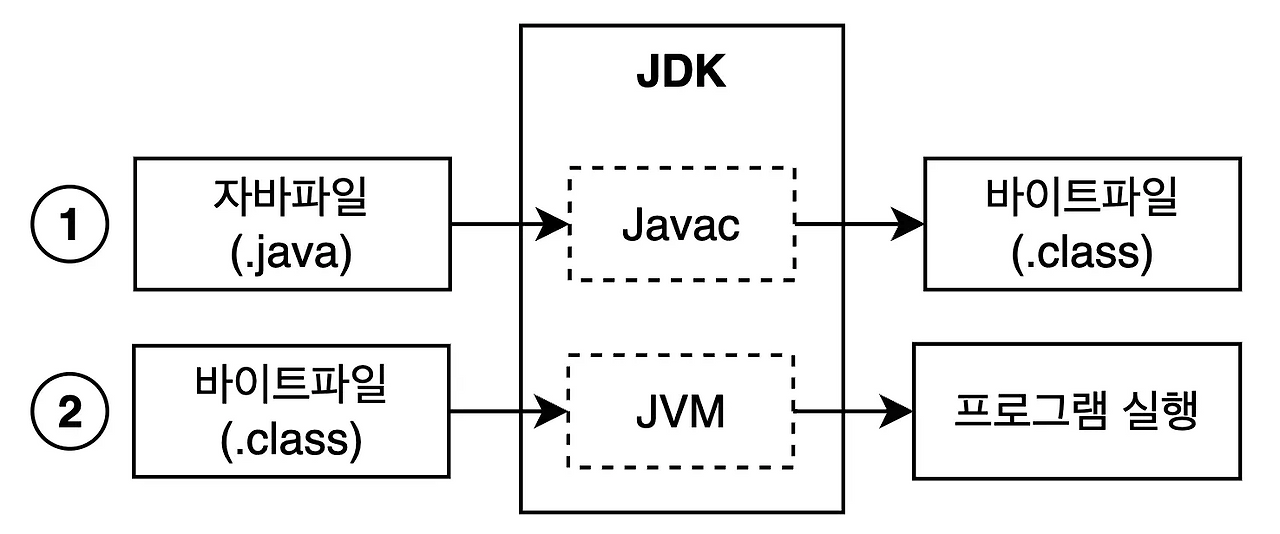
- 자바 파일 > 바이트 파일(out) > 프로그램 실행
- 1바이트 = 8비트
🧩 Java 프로젝트 관리
- 패키지
- 클래스 폴더 모음
- 패키지 이름 규칙: 소문자만 활용, 숫자 시작 금지, 특수문자 금지, 예약어 금지
- 클래스
- 하나의 파일
- 클래스 이름 규칙: 대문자 시작, 카멜케이스, 숫자시작 금지, 특수문자 금지, 예약어 금지
- 케이스
- 카멜케이스(camelCase 🐫): firstName, lastName, fullName
- 스네이크케이스(snake_case 🐍): first_name, last_name, full_name
- kebab-case: 문자와 문자 사이를 - 로 이어줌 / 소문자
- PascalCase: 클래스 이름 지정
- main
- public static votd : 시작점
- impotr: 어느 패키지에 속한 클래스 인지 표기
🧩 변수 / 자료형 / 형변환
1) 변수
- 변수란 데이터를 컴퓨터에 저장하기 위한 공간입니다.
- 변수 구조: [자료형] [변수이름][세미콜론] ex) ex) int a;
- 변수 이름 규칙: 카멜케이스 권장 / 숫자 시작x / 공백x / 예약어x / 특수문자(_,$사용o)
2) 변수 활용
- 변수 선언: int a; / int b;
- 변수에 값 할당: a=1; (변수이름=리터럴;) / 리터럴 = 변수안에 넣은 값
- 선언과 동시에 할당: int c = 3;
- 초기화(initialization): 초기 값으로 설정
- 기존 변수에 데이터 재할당(덮어쓰기): int c = 6 // C = 6
- 변수에 변수를 할당
더보기
int d = 1;
int e = d;
d = 10;
System.out.println("e = " + e); // e = 1
3) 자료형

- 구조: [자료형] [변수이름];
- 정수형: int / 4바이트 / 32비트
int a =1;
a = 2;
System.out.println("a = " + a);
// run
a = 2- 논리형: boolean / 1바이트 / 8비트
boolean booleanBox = true;
booleanBox = false;
System.out.println("booleanBox = " + booleanBox);
// run
booleanBox = false- 문자형: char / 2바이트 / 16비트
char charBox = 'a';
System.out.println("charBox = " + charBox);
// run
charBox = a- 큰 정수형: long / 8바이트
long longBox = 1;
longBox = 2;
System.out.println("longBox = " + longBox);
// run
longBox = 2- 실수형(소수점 표기 가능) : float(4바이트) / double(8바이트)
        float floatBox = 0.12345678f;
        System.out.println("floatBox = " + floatBox);
        // run
        floatBox = 0.12345678

        float floatBox = 0.12345678f;
        floatBox = 0.123456789f;
        System.out.println("floatBox = " + floatBox);
        // run
        floatBox = 0.12345679

        double doubleBox = 0.123456789;
        System.out.println("doubleBox = " + doubleBox)
        // run
        doubleBox = 0.123456789
4) 형변환
- 변수의 자료형을 다른 자료형으로 변경하는 것
- 다운캐스팅: 큰 데이터를 작은 상자에 넣는 것 / (int) 사용
        double bigBox = 10.123;
        int smallBox = (int) bigBox;
        System.out.println("smallBox = " + smallBox);
        // run
smallBox = 10- 업캐스팅: 작은 데이터를 큰 상자에 넣는 것
        int smallBox2 = 10;
        double bigBox2 = smallBox2;
        System.out.println("bigBox2 = " + bigBox2);
        // run
        bigBox2 = 10.0
🧩 입출력
1) 출력
- println: 줄바꿈
        System.out.println("Hello");
        System.out.println("Jana");
        // run
        Hello
	Jana
        System.out.print("안녕");
        System.out.print("자바");
        // run
안녕자바- println(" \ "): 개행문자 포함
System.out.print("안녕");
System.out.print("자바");
System.out.println("Hello\nWorld!");
//run
안녕자바Hello
World!
2) 입력

- 스캐너 객체를 스캐너형 박스(scanner)에 넣은 것
Scanner scanner = new Scanner(System.in);- 문자열 입력받기
        System.out.print("좋아하는 문장을 입력하세요:");
        String sentence = scanner.nextLine();
        System.out.println("sentence = " + sentence);
        // run
좋아하는 문장을 입력하세요:cat- 정수형(int, long) 입력받기
        System.out.print("정수(int)를 입력하세요:");
        int intBox = scanner.nextInt();
        System.out.println("intBox = " + intBox);

        System.out.print("정수(long)를 입력하세요:");
        long longbox = scanner.nextLong();
        System.out.println("longbox = " + longbox);
        //run
        정수(int)를 입력하세요:10
	intBox = 10
	정수(long)를 입력하세요:100000
longbox = 100000- 소수점
        System.out.print("소수점(double)을 입력하세요:");
        double doubleBox = scanner.nextDouble();
        System.out.println("doubleBox = " + doubleBox);
        // run
        소수점(double)을 입력하세요:1.123
	doubleBox = 1.123
더보기
자바 기초문법(2)
'🔌 SPARTA > Courses' 카테고리의 다른 글
| 객체지향 이해하기 (0) | 2026.01.09 |
|---|---|
| Java 기초문법(2) (0) | 2026.01.08 |
| GIT (0) | 2026.01.06 |
| HTTP와 REST API (1) | 2026.01.05 |
| 웹 개발의 기초(2) (0) | 2026.01.05 |