Lv 0. 에러 분석
1. 프로젝트 실행
1) ExpertApplication
package org.example.expert;

import org.springframework.boot.SpringApplication;
import org.springframework.boot.autoconfigure.SpringBootApplication;
import org.springframework.data.web.config.EnableSpringDataWebSupport;

import static org.springframework.data.web.config.EnableSpringDataWebSupport.PageSerializationMode.VIA_DTO;

@SpringBootApplication
@EnableSpringDataWebSupport(pageSerializationMode = VIA_DTO)
public class ExpertApplication {

    public static void main(String[] args) {

        SpringApplication.run(ExpertApplication.class, args);
    }

}
2) 에러 발생
Exception: org.springframework.beans.factory. UnsatisfiedDependencyException.
Message: Error creating bean with name 'filterConfig' defined in file ...
: Unsatisfied dependency expressed through constructor parameter 0
: Error creating bean with name 'jwtUtil'
: Injection of autowired dependencies failed- Exception: 의존성 주입 실패 예외
- message: FilterConfig 생성 실패
- : 생성자 매개변수 0 (생성자에 필요한 객체가 없음)
- : jwtUtil 생성 실패
- : 의존성 주입 실패
3) FilterConfig 클래스
package org.example.expert.config;

@Configuration
@RequiredArgsConstructor
public class FilterConfig {

    private final JwtUtil jwtUtil;
    private final ObjectMapper objectMapper;

    @Bean
    public FilterRegistrationBean<JwtFilter> jwtFilter() {
        FilterRegistrationBean<JwtFilter> registrationBean = new FilterRegistrationBean<>();
        registrationBean.setFilter(new JwtFilter(jwtUtil, objectMapper));
        registrationBean.addUrlPatterns("/*");

        return registrationBean;
    }
}- JwtUtil을 의존하고 있으며 생성자 주입을 통해 JwtUtil Bean을 주입받음
2. 문제
1) JwtUtil 클래스 코드
package org.example.expert.config;

@Slf4j(topic = "JwtUtil")
@Component
public class JwtUtil {

    private static final String BEARER_PREFIX = "Bearer ";
    private static final long TOKEN_TIME = 60 * 60 * 1000L; // 60분

    @Value("${jwt.secret.key}")
    private String secretKey;
    private Key key;
    private final SignatureAlgorithm signatureAlgorithm = SignatureAlgorithm.HS256;

    @PostConstruct
    public void init() {
        byte[] bytes = Base64.getDecoder().decode(secretKey);
        key = Keys.hmacShaKeyFor(bytes);
    }

    public String createToken(Long userId, String email, UserRole userRole) {
        Date date = new Date();

        return BEARER_PREFIX +
                Jwts.builder()
                        .setSubject(String.valueOf(userId))
                        .claim("email", email)
                        .claim("userRole", userRole)
                        .setExpiration(new Date(date.getTime() + TOKEN_TIME))
                        .setIssuedAt(date) // 발급일
                        .signWith(key, signatureAlgorithm) // 암호화 알고리즘
                        .compact();
    }

    public String substringToken(String tokenValue) {
        if (StringUtils.hasText(tokenValue) && tokenValue.startsWith(BEARER_PREFIX)) {
            return tokenValue.substring(7);
        }
        throw new ServerException("Not Found Token");
    }

    public Claims extractClaims(String token) {
        return Jwts.parserBuilder()
                .setSigningKey(key)
                .build()
                .parseClaimsJws(token)
                .getBody();
    }
}
2) 문제 코드
@Value("${jwt.secret.key}")
private String secretKey;- application.yml(또는 properties)에서 jwt.secret.key 라는 값을 찾아서 secretKey에 넣어주는 기능\
- application.yml 사용 이유
: 비밀값을 프로그램 코드 안에 작성하면 위험함 > 외부 파일로 분리
: 환경마다 값이 달라 바뀔 때마다 수정해야 하니 설정 파일에 값을 넣어 설정 파일만 변경하게끔 설정
: ${} = 설정 파일을 찾음
3. 해결
1) application.yml 생성
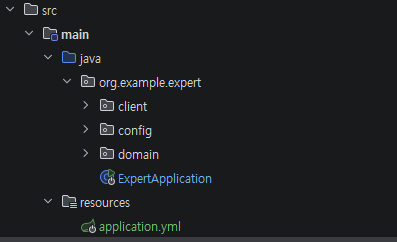
- resources 설정파일 경로 생성
- application.yml 파일 생성
2) Secret Key 조건
byte[] bytes = Base64.getDecoder().decode(secretKey);
key = Keys.hmacShaKeyFor(bytes);- Base64 문자열 사용
- 32바이트 이상 키 필요
3) Base64 문자열 랜덤 생성
Base64 Encode and Decode - Online
Encode to Base64 format or decode from it with various advanced options. Our site has an easy to use online tool to convert your data.
www.base64encode.org
- 랜덤 생성

4) JWT Secret Key 설정 추가
jwt:
  secret:
    key: 6rO87KCcIO2VmOq4sCDsi6vslrTsmpQg64SI66y0IOyWtOugpOybjOyalCDtnZHtnZE=
4. 트러블 슈팅
1) 문제: Secret Key 설정 추가 했으나 실행했을 때 에러 발생하며 실행 안 됨
WARN 20556 --- [main] ConfigServletWebServerApplicationContext
: Exception encountered during context initialization - cancelling refresh attempt
// 스프링 앱 시작 준비하다가 예외 때문에 시작 취소함
: Error creating bean with name 'entityManagerFactory'
// JPA가 쓰는 엔티티매니저 공장 만들다가 에러
: Failed to initialize dependency 'dataSourceScriptDatabaseInitializer'
// dataSourceScriptDatabaseInitializer 초기화 X
: Error creating bean with name 'dataSourceScriptDatabaseInitializer' defined in class path resource
: Error creating bean with name 'dataSource' defined in class path resource
// DB 연결 객체 생성 실패
: Failed to instantiate [com.zaxxer.hikari.HikariDataSource]
: Factory method 'dataSource' threw exception with message: Failed to determine a suitable driver class
// DataSource 생성 실패 (DB 드라이버 의존성 누락 또는 datasource 설정 누락 시 발생)
2) 해결: DataSource 설정 추가
spring:
  datasource:
    url: jdbc:mysql://localhost:3306/expert
    username: root
    password: 12345678
    driver-class-name: com.mysql.cj.jdbc.Driver
Lv 1. ArgumentResolver
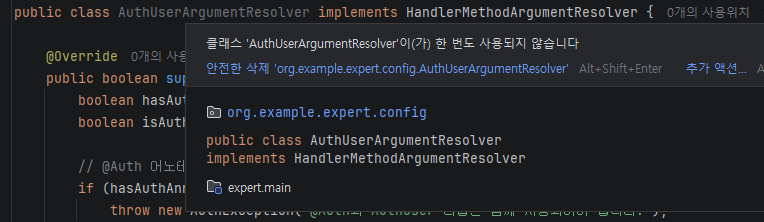
1. ArgumentResolver 역할
- AuthUser(userId, email, role) : 로그인한 사용자 정보
- 서버는 요청이 오면 JWT 토큰만 받음
토큰
↓
사용자 정보(userId, email, role) 추출
↓
AuthUser 객체 생성- 이걸 담당하는 게 ArgumentResolver
2. 문제
- 코드
package org.example.expert.config;

// AuthUserArgumentResolver 역할하는 클래스 선언
public class AuthUserArgumentResolver implements HandlerMethodArgumentResolver {

    // 파라미터 처리할 건지 물어봄(true -> 내가 처리)
    @Override
    public boolean supportsParameter(MethodParameter parameter) {
        // 파라미터에 @Auth가 붙어있으면 true
        boolean hasAuthAnnotation = parameter.getParameterAnnotation(Auth.class) != null;
        // 파라미터 타입이 AuthUser면 true
        boolean isAuthUserType = parameter.getParameterType().equals(AuthUser.class);

        // @Auth 어노테이션과 AuthUser 타입이 함께 사용되지 않은 경우 예외 발생
        if (hasAuthAnnotation != isAuthUserType) {
            throw new AuthException("@Auth와 AuthUser 타입은 함께 사용되어야 합니다.");
        }

        // @Auth 붙은 파라미터 처리
        return hasAuthAnnotation;
    }

    // authUser 만들어서 주는 공장
    @Override
    public Object resolveArgument(
            @Nullable MethodParameter parameter,
            @Nullable ModelAndViewContainer mavContainer,
            NativeWebRequest webRequest,
            @Nullable WebDataBinderFactory binderFactory
    ) {
        // 요청 꺼내기(헤더,쿠키,정보)
        HttpServletRequest request = (HttpServletRequest) webRequest.getNativeRequest();

        // JwtFilter 에서 set 한 userId, email, userRole 값을 가져옴
        Long userId = (Long) request.getAttribute("userId");
        String email = (String) request.getAttribute("email");
        UserRole userRole = UserRole.of((String) request.getAttribute("userRole"));

        return new AuthUser(userId, email, userRole);
    }
}- 요청 꺼내서 userId, email, userRole 통해 AuthUser 만들 수 있게끔 설정되어 있음
- 그러나 ArgumentResolver는 자동 동작 X -> WebMvcConfigurer를 통해 Resolver를 등록하여 동작하도록 설정
3) JwtFilter 클래스
public class JwtFilter implements Filter

httpRequest.setAttribute("userId", Long.parseLong(claims.getSubject()));
httpRequest.setAttribute("email", claims.get("email"));
httpRequest.setAttribute("userRole", claims.get("userRole"));- request에 userId, email, userRole을 넣고 있으므로 AuthUserArgumentResolver가 사용할 데이터는 정상적으로 전달
3. 해결
1) WebConfig
- 역할: 스프링 MVC 설정 파일
package org.example.expert.config;

@Configuration
public class WebConfig implements WebMvcConfigurer {
    @Override
    public void addArgumentResolvers(List<HandlerMethodArgumentResolver> resolvers) {

        resolvers.add(new AuthUserArgumentResolver());
    }
}- @Configuration 사용: 클래스 설정 파일 선언
- WebMvcConfigurer: MVC 설정
- @Override: 부모 메서드 재정의
- Spring이 사용하는 ArgumentResolver 목록(List)을 addArgumentResolvers() 메서드를 통해 전달받아,
해당 목록에 AuthUserArgumentResolver를 추가
2) 전체적인 흐름
클라이언트 요청
↓
JwtFilter (필터)
↓
request.setAttribute()로 사용자 정보 저장
↓
WebConfig (Resolver 등록)
↓
AuthUserArgumentResolver 실행
↓
AuthUser 생성
↓
Controller 파라미터 전달
Lv 2 코드 개선
1. Early Return
1) 문제
    @Transactional
    public SignupResponse signup(SignupRequest signupRequest) {

        // 비밀번호 암호화(인코딩)
        String encodedPassword = passwordEncoder.encode(signupRequest.getPassword());

        // 역할 생성
        UserRole userRole = UserRole.of(signupRequest.getUserRole());

        // 이메일 중복 확인
        if (userRepository.existsByEmail(signupRequest.getEmail())) {
            throw new InvalidRequestException("이미 존재하는 이메일입니다.");
        }

        User newUser = new User(
                signupRequest.getEmail(),
                encodedPassword,
                userRole
        );
        User savedUser = userRepository.save(newUser);

        String bearerToken = jwtUtil.createToken(savedUser.getId(), savedUser.getEmail(), userRole);

        return new SignupResponse(bearerToken);
}- 순서 문제 : 기존 코딩 흐름
비밀번호 인코딩 실행
↓
역할 생성
↓
이메일 중복 확인
↓
"이미 존재하는 이메일입니다" 예외 발생
↓
회원가입 실패- 이메일 중복이 걸렸을 때 가입 실패지만, encode() 가 먼저 실행되어 불필요한 로직이 실행되고 불필요한 연산 발생
- 성능 낭비
2) 해결
- 순서 변경: 올바른 코딩 흐름
이메일 중복 검사
↓
중복 시 예외 발생 > 종료
↓
비밀번호 인코딩
↓
역할 생성
↓
유저 생성
↓
저장- 코드 순서 변경
    @Transactional
    public SignupResponse signup(SignupRequest signupRequest) {

        // 이메일 중복 확인
        if (userRepository.existsByEmail(signupRequest.getEmail())) {
            throw new InvalidRequestException("이미 존재하는 이메일입니다.");
        }

        // 비밀번호 암호화(인코딩)
        String encodedPassword = passwordEncoder.encode(signupRequest.getPassword());

        // 역할 생성
        UserRole userRole = UserRole.of(signupRequest.getUserRole());

        User newUser = new User(
                signupRequest.getEmail(),
                encodedPassword,
                userRole
        );
        User savedUser = userRepository.save(newUser);

        String bearerToken = jwtUtil.createToken(savedUser.getId(), savedUser.getEmail(), userRole);

        return new SignupResponse(bearerToken);
    }
2. 불필요한 if-else 피하기
1) 문제
// body 꺼내서 오늘 날씨 목록에 넣음
WeatherDto[] weatherArray = responseEntity.getBody();

// 응답코드가 ok(200)이 아니면 예외처리(상태코드 출력)
if (!HttpStatus.OK.equals(responseEntity.getStatusCode())) {
    throw new ServerException("날씨 데이터를 가져오는데 실패했습니다. 상태 코드: " + responseEntity.getStatusCode());
} else {

// body가 null이거나 배열길이가 0이면 예외처리
    if (weatherArray == null || weatherArray.length == 0) {
        throw new ServerException("날씨 데이터가 없습니다.");
    }
}- else 가 필요한 경우: 조건을 두고 서로 다른 행동을 해야할 때
- else 가 필요없는 경우: 조건이 실패하면 바로 끝나는 경우
- 응답 200이 아닌 경우 예외처리하고 끝남 = else 필요없음
- 기준: if 안에서 return / throw가 있으면 else는 거의 필요 없음
2) 해결
- else 제거
        // body 꺼내서 오늘 날씨 목록에 넣음
        WeatherDto[] weatherArray = responseEntity.getBody();

        // 응답코드가 ok(200)이 아니면 예외처리(상태코드 출력)
        if (!HttpStatus.OK.equals(responseEntity.getStatusCode())) {
            throw new ServerException("날씨 데이터를 가져오는데 실패했습니다. 상태 코드: " + responseEntity.getStatusCode());
        }

        // body가 null이거나 배열길이가 0이면 예외처리
        if (weatherArray == null || weatherArray.length == 0) {
                throw new ServerException("날씨 데이터가 없습니다.");
        }
3. Validation
1) 문제
	if (userChangePasswordRequest.getNewPassword().length() < 8 ||
	// 길이가 8보다 작으면 실패
        !userChangePasswordRequest.getNewPassword().matches(".*\\d.*") ||
        // 문자 사이 숫자가 하나도 없으면 실패(.*: 아무문자, \d: 숫자, .*: 아무문자)
        !userChangePasswordRequest.getNewPassword().matches(".*[A-Z].*")) {
        // 대문자가 하나도 없으면 실패
    throw new InvalidRequestException("새 비밀번호는 8자 이상이어야 하고, 숫자와 대문자를 포함해야 합니다.");
}- 입력값 검증을 Service에서 진행 > 코드가 지저분해짐
- 서비스 = 비밀번호 변경, DB 저장, 기존 비밀번호 확인(비지니스 로직)
- 입력값 검증 로직 != 비지니스 로직 > DTO에서 검증 처리(Validation)
2) 해결
- DTO에 입력값 검증 로직 입력
    @NotBlank
    private String oldPassword;

    @NotBlank
    @Pattern(regexp = "^(?=.*\\d)(?=.*[A-Z]).{8,}$",
            message = "새 비밀번호는 8자 이상이어야 하고, 숫자와 대문자를 포함해야 합니다.")
private String newPassword;- Controller에 @Valid 어노테이션으로 DTO 검증 실행
    @PutMapping("/users")
    public void changePassword(@Auth AuthUser authUser, @Valid @RequestBody UserChangePasswordRequest userChangePasswordRequest) {
        userService.changePassword(authUser.getId(), userChangePasswordRequest);
}- Service에 입력값 검증 로직 삭제
Lv 3. N+1 문제
1. N+1
1) 개념(예시)
- 숙제 목록(Todo)와 작성자(User) : 숙제 하나에 작성자가 있음
숙제 목록
1. 수학 숙제 - 철수
2. 영어 숙제 - 영희
3. 과학 숙제 - 민수- N+1 방식
1. 선생님: 숙제 목록 다 가져와
2. 숙제 목록만 가져옴(수학, 영어, 과학) = DB조회 1번
3. 선생님: 수학 숙제 작성자 누구야?
4. DB 조회 = 철수
5. 선생님: 영어 숙제 작성자 누구야?
6. DB 조회 = 영희
7. 선생님: 과학 숙제 작성자 누구야?
8. DB 조회 = 민수- 결과: 숙제 조회 1번, 작성자 조회 3번
2) 문제점
- 숙제가 여러개면 1+100...=100...1번 DB 조회
- 서버 느려짐
3) fetch join과 @EntityGraph
- 숙제랑 작성자랑 같이 가져오자 = DB 1번 조회
- fetch join: JPQL로 “연관까지 같이 가져와”를 직접 적는 방식
Repository
@Query("select t from Todo t join fetch t.user where t.id = :todoId")
Optional<Todo> findByIdWithUser(@Param("todoId") Long todoId);- @EntityGraph: 어노테이션으로 “연관까지 같이 가져와”를 지정하는 방식
Repository
@EntityGraph(attributePaths = {"user"})
2. 문제
1) 과제
- fetch join 코드 > EntityGraph 코드로 변경
2) 기존 코드(fetch join)
public interface TodoRepository extends JpaRepository<Todo, Long> {

    @Query("SELECT t FROM Todo t LEFT JOIN FETCH t.user u ORDER BY t.modifiedAt DESC")
    Page<Todo> findAllByOrderByModifiedAtDesc(Pageable pageable);

    @Query("SELECT t FROM Todo t " +
            "LEFT JOIN FETCH t.user " +
            "WHERE t.id = :todoId")
    Optional<Todo> findByIdWithUser(@Param("todoId") Long todoId);

int countById(Long todoId);- 페이징(Page)에서는 fetch join이 문제를 만들 수 있어 EntityGraph로 변경
- fetch join은 연관 데이터를 붙이면서 결과 행이 늘어날 수 있어서, Page 페이징과 같이 쓰면 DB가 정확히 자르기 어려워
메모리 페이징이나 중복 문제가 생길 수 있음
3) 변경 코드(@EntityGraph)
public interface TodoRepository extends JpaRepository<Todo, Long> {

    @EntityGraph(attributePaths = {"user"})
    Page<Todo> findAllByOrderByModifiedAtDesc(Pageable pageable);

    @EntityGraph(attributePaths = {"user"})
    Optional<Todo> findByIdWithUser(Long todoId);

int countById(Long todoId);- fetch join(@Query, @Param)삭제 > @EntityGraph 사용
3. 트러블 슈팅
1) 메서드 이름
- 오류 코드
  @Transactional(readOnly = true)
    public TodoResponse getTodo(long todoId) {
        Todo todo = todoRepository.findByIdWithUser(todoId)
                .orElseThrow(() -> new InvalidRequestException("Todo not found"));
@EntityGraph(attributePaths = {"user"})
Optional<Todo> findByIdWithUser(Long todoId);- 에러 코드
: Could not create query for public abstract java.util.Optional org.example.expert.domain.todo.repository.TodoRepository.findByIdWithUser(java.lang.Long); Reason: Failed to create query for method public abstract java.util.Optional org.example.expert.domain.todo.repository.TodoRepository.findByIdWithUser(java.lang.Long); No property 'withUser' found for type 'Long'; Traversed path: Todo.id
- 스프링이 findByIdWithUser라는 메서드 이름을 보고 자동 쿼리(파생쿼리)를 만들려고 했는데 실패
- Todo.id(타입 Long) 안에 withUser라는 필드가 있다고 착각
- 해결: findById로 변경 > Service 로직도 같이 변경
    @EntityGraph(attributePaths = {"user"})
    Optional<Todo> findById(Long todoId);
@Transactional(readOnly = true)
public TodoResponse getTodo(long todoId) {
Todo todo = todoRepository.findById(todoId)
.orElseThrow(() -> new InvalidRequestException("Todo not found"));
Lv 4. 테스트 코드 연습
1. matches 테스트
1) 문제 코드
    @Test
    void matches_메서드가_정상적으로_동작한다() {
        // given
        String rawPassword = "testPassword";
        String encodedPassword = passwordEncoder.encode(rawPassword);

        // when
        boolean matches = passwordEncoder.matches(encodedPassword, rawPassword);

        // then
        assertTrue(matches);
    }
- @Test: 테스트 코드 선언
- 원래 비밀번호 = testPassword
- encodedPassword: 비밀번호 암호화
예시)
testPassword
↓
$2a$10$asdasd123123asdasd- boolean matches: 비밀번호 비교(암호화된 비밀번호, 원래 비밀번호)
- matches 결과가 true여야 테스트 성공
2) 문제
        // when
boolean matches = passwordEncoder.matches(encodedPassword, rawPassword);- 순서가 잘못됨
3) 해결
   // when
boolean matches = passwordEncoder.matches(rawPassword, encodedPassword);- 기존: 암호화 비밀번호, 원래 비밀번호
- 변경: 원래 비밀번호, 암호화 비밀번호
2. managet 목록 조회 테스트
1) 문제 코드
    @Test
    public void manager_목록_조회_시_Todo가_없다면_NPE_에러를_던진다() {
        // given

        // 1번 Todo를 조회하는 상황
        long todoId = 1L;

        // “todoId=1로 조회했는데 Todo가 없는 상황”을 테스트에서 강제로 만듬
        given(todoRepository.findById(todoId)).willReturn(Optional.empty());

        // when & then
        // managerService.getManagers(todoId)를 실행했을 때
        // InvalidRequestException 예외가 발생하는지 확인
        // 예외가 터지면 exception 변수에 담음
        InvalidRequestException exception = assertThrows(InvalidRequestException.class,
                () -> managerService.getManagers(todoId));

        // 예외 메세지가 Manager not found 여야 통과
        assertEquals("Manager not found", exception.getMessage());
}- NullPointerException (NPE): null인 객체를 사용하려고 할 때 발생하는 오류
- InvalidRequestException(커스텀): 요청이 잘못됨
2) 문제
- 메서드명이 올바르지 않음
: InvalidRequestException 예외처리를 받고 있으나 NPE 발생한다고 잘못 설명되어 있음 - 예외 메세지가 올바르지 않음
: Todo가 없는 경우를 발생시키는 테스트이나, 메세지는 manager이 없는 경우로 되어 있음
3) 해결
- 메서드명 변경
    @Test
public void manager_목록_조회_시_Todo가_없다면_InvalidRequestException_에러를_던진다() {- 예외 메세지 변경
assertEquals("Todo not found", exception.getMessage());
3. comment 등록 테스트
1) 문제 코드
    @Test
    public void comment_등록_중_할일을_찾지_못해_에러가_발생한다() {
        // given

        // 1번 Todo에 댓글 등록하려고 함
        long todoId = 1;

        // contents(댓글 내용)로 댓글 등록 요청 객체 생성
        CommentSaveRequest request = new CommentSaveRequest("contents");
        // 댓글을 작성하는 사용자 정보 생성
        AuthUser authUser = new AuthUser(1L, "email", UserRole.USER);

	// Todo 조회가 없는 상황
        given(todoRepository.findById(anyLong())).willReturn(Optional.empty());

        // when
        // saveComment() 실행 시 ServerException이 발생
        // exception 변수에 저장
        ServerException exception = assertThrows(ServerException.class, () -> {
            commentService.saveComment(authUser, todoId, request);
        });

        // then
        // 예외 메시지가 "Todo not found" 인지 확인
        assertEquals("Todo not found", exception.getMessage());
    }
필요:class org.example.expert.domain.common.exception.ServerException
실제 :class org.example.expert.domain.common.exception.InvalidRequestException- InvalidRequestException: 사용자 요청이 잘못됐을 때 예외
- ServerException: 서버 내부에서 문제가 발생했을 때 사용하는 예외
2) 문제
- Todo 조회했을 때 할 일이 없는 경우에는 서버 오류가 아닌 잘못된 요청(존재하지 않는 데이터)
- 그렇기 때문에 InvalidRequestException 예외처리를 하는 것이 맞음
3) 해결
        InvalidRequestException exception = assertThrows(InvalidRequestException.class, () -> {
            commentService.saveComment(authUser, todoId, request);
});- 기존: ServerException 예외처리
- 변경: InvalidRequestException 예외처리
given(todoRepository.findById(anyLong())).willReturn(Optional.empty());
↓
given(todoRepository.findById(todoId)).willReturn(Optional.empty());- 기존: 모든 long 값 허용
- 변경: todoId 값 정확하게 테스트
4. null 예외처리
1) 문제코드
    @Test
    void todo의_user가_null인_경우_예외가_발생한다() {
        // given

        // 요청한 사람(1번 일반 사용자)
        AuthUser authUser = new AuthUser(1L, "a@a.com", UserRole.USER);

        // 1번 Todo에 2번 유저를 담당자로 지정하려 함
        long todoId = 1L;
        long managerUserId = 2L;

	// Todo를 만들고 user을 null로 만듬
        Todo todo = new Todo();
        ReflectionTestUtils.setField(todo, "user", null);

	// 매니저 지정 요청 객체 생성(DTO)
        ManagerSaveRequest managerSaveRequest = new ManagerSaveRequest(managerUserId);
	// Todo가 있는 상황 가정
        given(todoRepository.findById(todoId)).willReturn(Optional.of(todo));

        // when & then
        // managerService.saveManager(authUser, todoId, managerSaveRequest)를 실행했을 때
        // InvalidRequestException이 발생하는지 확인하고,
        // 발생한 예외를 exception 변수에 저장
        InvalidRequestException exception = assertThrows(InvalidRequestException.class, () ->
            managerService.saveManager(authUser, todoId, managerSaveRequest)
        );

        assertEquals("일정을 생성한 유저만 담당자를 지정할 수 있습니다.", exception.getMessage());
    }
2) 문제
- ManagerService
if (!ObjectUtils.nullSafeEquals(user.getId(), todo.getUser().getId())) {
throw new InvalidRequestException("일정을 생성한 유저만 담당자를 지정할 수 있습니다.");
}- todo.getUser() = null 인데 유저의 todo.getUser().getId()를 꺼내려고 하니 NPE 발생
3) 해결
- getId()를 하기 전에 user가 null이 아닌지 먼저 확인
        if(todo.getUser() == null){
            throw new InvalidRequestException("일정을 생성한 유저만 담당자를 지정할 수 있습니다.");
        }

        if (!ObjectUtils.nullSafeEquals(user.getId(), todo.getUser().getId())) {
            throw new InvalidRequestException("일정을 생성한 유저만 담당자를 지정할 수 있습니다.");
        }
'🔌 SPARTA > Assignments' 카테고리의 다른 글
| [플러스 Spring] 코드 개선 과제 (0) | 2026.04.03 |
|---|---|
| [클라우드 과제] 클라우드_아키텍처 설계 & 배포 (0) | 2026.03.13 |
| [Spring 과제] 일정 관리 앱 Develop (0) | 2026.02.13 |
| [Spring 과제] 일정 관리 앱 만들기 (0) | 2026.02.05 |
| [Java 문법] 커머스 과제 (1) | 2026.01.23 |