API 명세서 및 ERD 작성
1. API 명세서
- 요청: Method, Endpoint, header, body, 필드
- 응답: 필드, 상태코드
- 깃허브/리드미
GitHub - eunjiom/schedule
Contribute to eunjiom/schedule development by creating an account on GitHub.
github.com
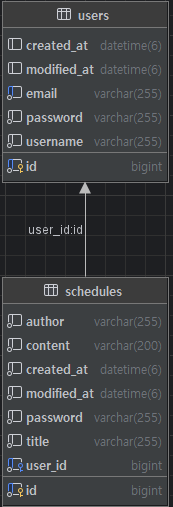
2. ERD
일정 CRUD
1. 일정 생성
1) Controller: 일정생성 / 요청바디 검증 / 상태코드 반환
// 생성
@PostMapping
public ResponseEntity<CreateScheduleResponse> create(
        @Valid @RequestBody CreateScheduleRequest request,
        HttpSession session
) {
    return ResponseEntity.status(HttpStatus.CREATED)
            .body(scheduleService.createSchedule(request, session));
}- @Valid: 검증
- ResponseEntity: HTTP 응답을 직접 만들 수 있게 해주는 스프링 클래스
- HttpSession session: 로그인 했는지 기억하는 것
2) Service: 로그인 유저 확인, 일정 엔티티 생성, DB 저장, 응답 DTO 반환
@Transactional
public CreateScheduleResponse createSchedule(
        CreateScheduleRequest request,
        HttpSession session
) {
    Long loginUserId = getLoginUserId(session);

    User user = userRepository.findById(loginUserId)
            .orElseThrow(() -> new ResponseStatusException(
                    HttpStatus.NOT_FOUND, "유저를 찾을 수 없습니다."
            ));

    Schedule schedule = new Schedule(
            request.getTitle(),
            request.getContent(),
            user
    );

    Schedule saved = scheduleRepository.save(schedule);

    return new CreateScheduleResponse(
            saved.getId(),
            saved.getTitle(),
            saved.getContent(),
            user.getUsername(),
            saved.getCreatedAt(),
            saved.getModifiedAt()
    );
}- @Transactional: 여러 작업을 하나로 묶어서 처리 / All or Nothing
- ResponseStatusException: 이 상황은 HTTP 몇 번 상태
3) DTO
① CreateScheduleRequest: 일정 생성 요청 데이터
@Getter
@NoArgsConstructor
public class CreateScheduleRequest {
    @NotBlank private String title;
    @NotBlank private String content;
}- @NotBlank: 비어있으면 X
- @NoArgsConstructor: 기본 생성자 자동 생성
② CreateScheduleResponse: 일정 생성 결과 응답 객체
@Getter
@AllArgsConstructor
public class CreateScheduleResponse {
    private Long id;
    private String title;
    private String content;
    private String username;
    private LocalDateTime createdAt;
    private LocalDateTime modifiedAt;
}- @AllArgsConstructor: 변수를 한 번에 채워 넣을 수 있는 생성자 자동으로 만들어줌
4) Entity: DB 테이블을 자바 객체로 표현 / 작성자 정보까지 관계로 묶어서 관리
@Getter
@Entity
@Table(name = "schedules")
@NoArgsConstructor(access = AccessLevel.PROTECTED)
public class Schedule extends BaseTime {

    @Id @GeneratedValue(strategy = GenerationType.IDENTITY)
    private Long id;

    @Column(nullable = false)
    private String title;

    @Column(nullable = false, columnDefinition = "TEXT")
    private String content;

// 일정은 "작성자 이름 문자열"이 아니라 "유저"를 들고 있어야 함
    @ManyToOne(fetch = FetchType.LAZY)
    @JoinColumn(name = "user_id", nullable = false)
    private User user;

// 생성
    public Schedule(String title, String content, User user) {
        this.title = title;
        this.content = content;
        this.user = user;
    }

// 수정
    public void update(String title, String content) {
        this.title = title;
        this.content = content;
    }
}- @ManyToOne: 많은 일정이 하나에 속해있음
- (fetch = LAZY): 필요할 때만 가져옴 <=> EAGER = 바로 다 가져옴
- @JoinColumn(name="user_id"): 일정이 어떤 유저인지 알려주는 칸 이름은 user_id
2. 일정조회(전체조회/단건조회)
1) Controller
// 전체 조회
@GetMapping
public ResponseEntity<List<GetOneScheduleResponse>> getAll() {
    return ResponseEntity.ok(scheduleService.getSchedules());
}

// 단건 조회
@GetMapping("/{id}")
public ResponseEntity<GetOneScheduleResponse> getOne(@PathVariable Long id) {
    return ResponseEntity.ok(scheduleService.getSchedule(id));
}
2) Service
@Transactional(readOnly = true)
public List<GetOneScheduleResponse> getSchedules() {
    return scheduleRepository.findAll()
            .stream()
            .map(s -> new GetOneScheduleResponse(
                    s.getId(),
                    s.getTitle(),
                    s.getContent(),
                    s.getUser().getUsername(),
                    s.getCreatedAt(),
                    s.getModifiedAt()
            ))
            .toList();
}

@Transactional(readOnly = true)
public GetOneScheduleResponse getSchedule(Long id) {
    Schedule s = scheduleRepository.findById(id)
            .orElseThrow(() -> new ResponseStatusException(
                    HttpStatus.NOT_FOUND, "일정을 찾을 수 없습니다."
            ));

    return new GetOneScheduleResponse(
            s.getId(),
            s.getTitle(),
            s.getContent(),
            s.getUser().getUsername(),
            s.getCreatedAt(),
            s.getModifiedAt()
    );
}- @Transactional(readOnly = true): 읽기전용
- .stream() .map(user -> new GetOneUserResponse(...)) .toList(); : 하나씩 꺼내서(stream) 다른 모양으로 바꿔서(map) 다시 모아줘(toList) User > Response로 변환
3) DTO: GetOneScheduleResponse
package kr.spartaclub.schedule_api.dto;

import lombok.AllArgsConstructor;
import lombok.Getter;
import java.time.LocalDateTime;

@Getter
@AllArgsConstructor
public class GetOneScheduleResponse {
    private Long id;
    private String title;
    private String content;
    private String username;
    private LocalDateTime createdAt;
    private LocalDateTime modifiedAt;
}
3. 일정 수정
1) Controller
// 수정(PATCH)
@PatchMapping("/{id}")
public ResponseEntity<UpdateScheduleResponse> update(
        @PathVariable Long id,
        @RequestBody UpdateScheduleRequest request,
        HttpSession session
) {
    return ResponseEntity.ok(scheduleService.updateSchedule(id, request, session));
}
2) Service: updateSchedule
@Transactional
public UpdateScheduleResponse updateSchedule(
        Long id,
        UpdateScheduleRequest request,
        HttpSession session
) {
    Long loginUserId = getLoginUserId(session);

    Schedule s = scheduleRepository.findById(id)
            .orElseThrow(() -> new ResponseStatusException(
                    HttpStatus.NOT_FOUND, "일정을 찾을 수 없습니다."
            ));

    if (!s.getUser().getId().equals(loginUserId)) {
        throw new ResponseStatusException(HttpStatus.FORBIDDEN, "수정 권한이 없습니다.");
    }

    String newTitle = (request.getTitle() != null) ? request.getTitle() : s.getTitle();
    String newContent = (request.getContent() != null) ? request.getContent() : s.getContent();

    s.update(newTitle, newContent);

    return new UpdateScheduleResponse(
            s.getId(),
            s.getTitle(),
            s.getContent(),
            s.getUser().getUsername(),
            s.getCreatedAt(),
            s.getModifiedAt()
    );
}- != null: null 값이면 안 바꿈
3) DTO
① UpdateScheduleRequest
package kr.spartaclub.schedule_api.dto;

import lombok.Getter;
import lombok.NoArgsConstructor;

@Getter
@NoArgsConstructor
public class UpdateScheduleRequest {
    private String title;   // 부분 수정 -> null 허용
    private String content; // 부분 수정 -> null 허용
}
② UpdateScheduleResponse
package kr.spartaclub.schedule_api.dto;

import lombok.AllArgsConstructor;
import lombok.Getter;
import java.time.LocalDateTime;

@Getter
@AllArgsConstructor
public class UpdateScheduleResponse {
    private Long id;
    private String title;
    private String content;
    private String username;
    private LocalDateTime createdAt;
    private LocalDateTime modifiedAt;
}
4. 일정삭제
1) Controller
// 삭제
@DeleteMapping("/{id}")
public ResponseEntity<Void> delete(@PathVariable Long id, HttpSession session) {
    scheduleService.deleteSchedule(id, session);
    return ResponseEntity.noContent().build();
}
2) Service
@Transactional
public void deleteSchedule(Long id, HttpSession session) {
    Long loginUserId = getLoginUserId(session);

    Schedule s = scheduleRepository.findById(id)
            .orElseThrow(() -> new ResponseStatusException(
                    HttpStatus.NOT_FOUND, "일정을 찾을 수 없습니다."
            ));

    if (!s.getUser().getId().equals(loginUserId)) {
        throw new ResponseStatusException(HttpStatus.FORBIDDEN, "삭제 권한이 없습니다.");
    }

    scheduleRepository.delete(s);
}
5. ScheduleService: 로그인 유저 체크
private static final String LOGIN_USER = "LOGIN_USER";

private Long getLoginUserId(HttpSession session) {
    Object userId = session.getAttribute(LOGIN_USER);

    if (userId == null) {
        throw new ResponseStatusException(HttpStatus.UNAUTHORIZED, "로그인이 필요합니다.");
    }
    return (Long) userId;
}
유저 CRUD
1. 유저생성(회원가입)
1) Controller
@RestController
@RequestMapping("/users")
public class UserController {

    private final UserService userService;

public Us- @RestController: API 전용 컨트롤러 > JSON 응답
- private final UserRepository: 스프링이 질문할 수 있는 도구 넣어준 것(메일이 DB에 존재하는지 확인)
/ 도구 바뀌지 않게 final 설정
// 회원가입
@PostMapping("/signup")
public ResponseEntity<CreateUserResponse> signup(
        @Valid @RequestBody CreateUserRequest request
) {
    CreateUserResponse response = userService.signup(request);
    return ResponseEntity.status(HttpStatus.CREATED).body(response);
}- @RequestBody UserSignupRequest request): 사용자가 보낸 JSON 데이터를 request에 반환
- ResponseEntity<UserResponse> signup: 상태코드까지 담아서 보내는 상자 <응답형태> 회원가입 기능 이름
2) Service
@Transactional
public CreateUserResponse signup(CreateUserRequest request) {

    // 1) 이메일 중복 체크
    if (userRepository.existsByEmail(request.getEmail())) {
        throw new ResponseStatusException(HttpStatus.CONFLICT, "이미 존재하는 이메일입니다.");
    }

    // 2) 엔티티 생성
    User user = new User(
            request.getUsername(),
            request.getEmail(),
            request.getPassword()
    );

    // 3) 저장
    User savedUser = userRepository.save(user);

    // 4) 응답 DTO
    return new CreateUserResponse(
            savedUser.getId(),
            savedUser.getUsername(),
            savedUser.getEmail(),
            savedUser.getCreatedAt(),
            savedUser.getModifiedAt()
    );
}- User savedUser = userRepository.save(user); : DB값 저장
3) DTO
① CreateUserRequest
package kr.spartaclub.schedule_api.dto;

import jakarta.validation.constraints.Email;
import jakarta.validation.constraints.NotBlank;
import jakarta.validation.constraints.Size;

public class CreateUserRequest {

    @NotBlank
    private String username;

    @NotBlank @Email
    private String email;

    @NotBlank @Size(min = 8)
    private String password;

    public String getUsername() { return username; }
    public String getEmail() { return email; }
    public String getPassword() { return password; }
}
② CreateUserResponse
package kr.spartaclub.schedule_api.dto;

import lombok.AllArgsConstructor;
import lombok.Getter;
import java.time.LocalDateTime;

@Getter
@AllArgsConstructor
public class CreateUserResponse {
    private Long id;
    private String username;
    private String email;
    private LocalDateTime createdAt;
    private LocalDateTime modifiedAt;
}
4) Entity
package kr.spartaclub.schedule_api.entity;

import jakarta.persistence.*;
import lombok.AccessLevel;
import lombok.Getter;
import lombok.NoArgsConstructor;

@Getter
@Entity
@Table(name = "users")
@NoArgsConstructor(access = AccessLevel.PROTECTED)
public class User extends BaseTime {

    @Id @GeneratedValue(strategy = GenerationType.IDENTITY)
    private Long id;

    @Column(nullable = false)
    private String username;

    @Column(nullable = false, unique = true)
    private String email;

    @Column(nullable = false)
    private String password;

    // 회원 생성
    public User(String username, String email, String password) {
        this.username = username;
        this.email = email;
        this.password = password;
    }

    // 회원 수정
    public void update(String username, String email, String password) {
        if (username != null) this.username = username;
        if (email != null) this.email = email;
        if (password != null) this.password = password;
    }
}
2. 유저조회(전체조회/단건조회)
1) Controller
// 전체 조회
@GetMapping
public ResponseEntity<List<GetOneUserResponse>> getUsers() {
    return ResponseEntity.ok(userService.findAllUsers());
}

// 단건 조회
@GetMapping("/{id}")
public ResponseEntity<GetOneUserResponse> getUser(@PathVariable Long id) {
    return ResponseEntity.ok(userService.findUser(id));
}- @GetMapping: 조회 요청
- @PathVariable: URL에 있는 값을 가져옴 (예: /users/1 → id = 1)
- ResponseEntity.ok(): 200 OK 응답
2) Service
@Transactional(readOnly = true)
public List<GetOneUserResponse> findAllUsers() {
    return userRepository.findAll()
            .stream()
            .map(user -> new GetOneUserResponse(
                    user.getId(),
                    user.getUsername(),
                    user.getEmail(),
                    user.getCreatedAt(),
                    user.getModifiedAt()
            ))
            .toList();
}

@Transactional(readOnly = true)
public GetOneUserResponse findUser(Long id) {
    User user = userRepository.findById(id)
            .orElseThrow(() -> new ResponseStatusException(
                    HttpStatus.NOT_FOUND, "유저를 찾을 수 없습니다."
            ));

    return new GetOneUserResponse(
            user.getId(),
            user.getUsername(),
            user.getEmail(),
            user.getCreatedAt(),
            user.getModifiedAt()
    );
}- @Transactional(readOnly = true): 읽기 전용 (성능 최적화 목적)
- userRepository.findAll(): 모든 유저 조회
- .stream() .map(...) .toList(): 하나씩 꺼내서(stream) → 다른 모양으로 바꿔서(map) → 다시 리스트로 모음(toList)
- User → GetOneUserResponse 로 변환
- orElseThrow(): 값이 없으면 예외 발생
- HttpStatus.NOT_FOUND (404): 존재하지 않는 데이터
3) DTO
① GetOneUserResponse
@Getter
@AllArgsConstructor
public class GetOneUserResponse {
    private Long id;
    private String username;
    private String email;
    private LocalDateTime createdAt;
    private LocalDateTime modifiedAt;
}- @AllArgsConstructor: 모든 필드를 채우는 생성자 자동 생성
- 비밀번호는 응답에 포함하지 않음 → 보안상 클라이언트에 내려주면 안 됨
3. 유저 수정
1) Controller
// 유저 수정
@PatchMapping("/{id}")
public ResponseEntity<UpdateUserResponse> updateUser(
        @PathVariable Long id,
        @Valid @RequestBody UpdateUserRequest request
) {
    return ResponseEntity.ok(userService.updateUser(id, request));
}- @PatchMapping: 부분 수정
- @Valid: DTO 유효성 검사
- ResponseEntity.ok(): 200 OK 반환
2) Service
@Transactional
public UpdateUserResponse updateUser(Long id, UpdateUserRequest request) {
    User user = userRepository.findById(id)
            .orElseThrow(() -> new ResponseStatusException(
                    HttpStatus.NOT_FOUND, "유저를 찾을 수 없습니다"
            ));

    // 이메일 중복 검사
    if (request.getEmail() != null) {
        userRepository.findByEmail(request.getEmail())
                .filter(found -> !found.getId().equals(id))
                .ifPresent(found -> {
                    throw new ResponseStatusException(
                            HttpStatus.CONFLICT, "이미 사용중인 이메일입니다."
                    );
                });
    }

    user.update(
            request.getUsername(),
            request.getEmail(),
            request.getPassword()
    );

    return new UpdateUserResponse(
            user.getId(),
            user.getUsername(),
            user.getEmail(),
            user.getCreatedAt(),
            user.getModifiedAt()
    );
}- filter(found -> !found.getId().equals(id)): 찾은 유저가 "나 자신"이 아닐 때만 중복 처리
- ifPresent(): 값이 존재하면 실행
- HttpStatus.CONFLICT (409): 중복 데이터
- user.update(): null이 아닌 값만 변경
- PATCH 방식 = 전달된 값만 수정
3) DTO
① UpdateUserRequest
@Getter
@NoArgsConstructor
public class UpdateUserRequest {
    private String username;

    @Email(message = "이메일 형식이 올바르지 않습니다.")
    private String email;

    @Size(min = 8, message = "비밀번호 8글자 이상이어야 합니다.")
    private String password;
}- @Email: 이메일 형식 검사
- @Size(min = 8): 최소 길이 제한
② UpdateUserResponse
@Getter
@AllArgsConstructor
public class UpdateUserResponse {
    private Long id;
    private String username;
    private String email;
    private LocalDateTime createdAt;
    private LocalDateTime modifiedAt;
}
4. 유저 삭제
1) Controller
// 유저 삭제
@DeleteMapping("/{id}")
public ResponseEntity<Void> deleteUser(@PathVariable Long id) {
    userService.deleteUser(id);
    return ResponseEntity.noContent().build();
}- @DeleteMapping: 삭제 요청
- ResponseEntity<Void>: 응답 데이터 없음
- noContent(): 204 No Content 반환
2) Service
@Transactional
public void deleteUser(Long id) {
    User user = userRepository.findById(id)
            .orElseThrow(() -> new ResponseStatusException(
                    HttpStatus.NOT_FOUND, "유저를 찾을 수 없습니다."
            ));
    userRepository.delete(user);
}- delete(): DB에서 해당 데이터 삭제
- 404 NOT_FOUND: 존재하지 않는 유저
로그인(인증)
1) DTO - LoginRequest
@Getter
@NoArgsConstructor
public class LoginRequest {

    @NotBlank(message = "이메일은 필수입니다.")
    @Email(message = "이메일 형식이 올바르지 않습니다.")
    private String email;

    @NotBlank(message = "비밀번호는 필수입니다.")
    private String password;
}- @NotBlank: 비어있으면 X
- @Email: 이메일 형식 검증
- @NoArgsConstructor: 기본 생성자 자동 생성 → @RequestBody로 JSON을 받을 때 기본 생성자가 필요할 수 있음
2) Service
@Transactional
public String login(LoginRequest request, HttpSession session) {

    // 이메일 유저 찾기
    User user = userRepository.findByEmail(request.getEmail())
            .orElseThrow(() -> new ResponseStatusException(
                    HttpStatus.UNAUTHORIZED,
                    "이메일 또는 비밀번호가 올바르지 않습니다"
            ));

    // 비밀번호 확인
    if (!user.getPassword().equals(request.getPassword())) {
        throw new ResponseStatusException(
                HttpStatus.UNAUTHORIZED,
                "이메일 또는 비밀번호가 올바르지 않습니다"
        );
    }

    // 로그인 성공 -> 세션 저장
    session.setAttribute("LOGIN_USER", user.getId());

    return "로그인 성공";
}- @Transactional: 로그인 로직도 하나의 작업 단위로 처리
- userRepository.findByEmail(): 이메일로 유저 조회
- orElseThrow(): 이메일이 없으면 예외 발생
- HttpStatus.UNAUTHORIZED (401): 인증 실패(로그인 실패)
- 비밀번호 검증: DB 비밀번호와 입력 비밀번호 비교
- session.setAttribute("LOGIN_USER", user.getId()); : 로그인 성공 상태를 세션에 저장
- key = "LOGIN_USER" value = user.getId() → 이후 일정 생성/수정/삭제에서 세션 값을 꺼내 “로그인 여부” 확인
3) Controller
@PostMapping("/login")
public ResponseEntity<String> login(
        @Valid @RequestBody LoginRequest request,
        HttpSession session
) {
    String message = userService.login(request, session);
    return ResponseEntity.ok(message);
}- @PostMapping("/login"): 로그인 요청
- @Valid: LoginRequest 유효성 검사 실행 → 실패하면 400 BAD REQUEST 반환
- HttpSession session: 서버가 로그인 상태를 기억하는 저장소
- ResponseEntity<String>: 로그인 성공 메시지 반환 (200 OK)
4) 로그인 이후: ScheduleService
session.setAttribute("LOGIN_USER", user.getId());
- LOGIN_USER가 없으면 → 401 (로그인 필요)
- LOGIN_USER가 있는데 작성자랑 다르면 → 403 (권한 없음)
'🔌 SPARTA > Assignments' 카테고리의 다른 글
| [클라우드 과제] 클라우드_아키텍처 설계 & 배포 (0) | 2026.03.13 |
|---|---|
| [Spring 과제] 코드 개선 (1) | 2026.03.04 |
| [Spring 과제] 일정 관리 앱 만들기 (0) | 2026.02.05 |
| [Java 문법] 커머스 과제 (1) | 2026.01.23 |
| [Java] 계산기 과제 2회차 : 1회차와의 차이점(2) (0) | 2026.01.21 |